

Digital Passport Photo Requirements: Pixels, KB and Format by Country
The pixel, file size and format limits for digital passport and visa photos in the US, UK, Canada and India, from official pages, and what you can safely do to meet them.
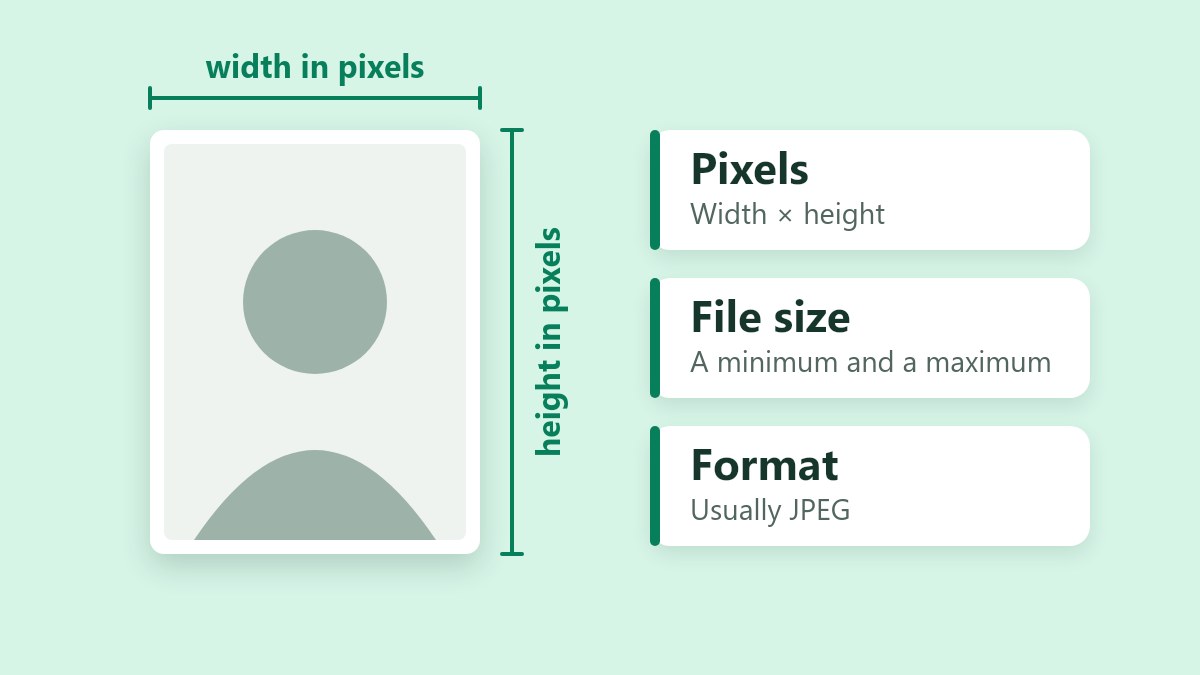
Digital passport photo requirements come down to three limits: the photo's size in pixels, its file size in KB and its format. They differ by country, and several set a minimum file size as well as a maximum. This guide lists the limits for the United States, the United Kingdom, Canada and India from each government's own pages, then shows how to meet them without breaking the rules on altered photos.
I checked these pages on October 8, 2026. Governments change them, so confirm the numbers on the official page before you upload.
Digital Passport Photo Requirements at a Glance
Here are the limits side by side. "Not stated" means the official page I read doesn't give that figure.
| Country and form | Pixels | File size | Format | Also required |
|---|---|---|---|---|
| US passport renewal | Not stated | 54 KB to 10 MB | JPEG, PNG, HEIC or HEIF | Color, taken in the last 6 months, no filters |
| US visa photos | 600 × 600 up to 1,200 × 1,200, square | Up to 240 KB | JPEG | 24-bit sRGB color, compression ratio of 20:1 or lower |
| US Diversity Visa | 600 × 600, square | Up to 240 KB | JPEG | None stated |
| UK passport | At least 600 × 750 | 50 KB to 10 MB | Not stated | Color, plain light-coloured background, unaltered |
| Canada passport | 1,200 × 1,800 up to 3,000 × 4,500 | 200 KB to 5 MB | JPEG | Commercial photographer, saved straight from the camera |
| India passport | 630 × 810 | Not stated | Not stated | Color, white background, face 80% to 85% of the photo, unaltered |
Three things stand out.
- Pixel limits take three forms: a minimum (UK), a range (Canada, US visas) or one exact size (India, US Diversity Visa).
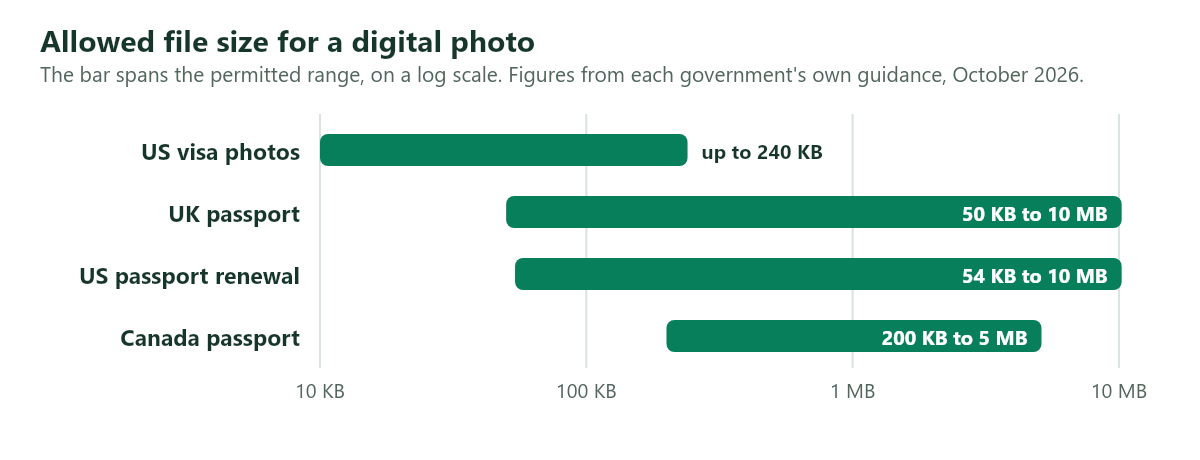
- The UK, Canada and US renewals set a minimum file size as well as a maximum. US visa photos and Diversity Visa entries only have a cap.
- The shape differs too. US visa photos are square, Canada wants a 3:2 portrait, and India's 630 × 810 works out to 7:9.
The chart shows the file-size ranges. The bar spans what each form allows.
Pixels, File Size and Format: What Each Limit Means
- Pixels are the picture's width and height. More pixels means more detail, not a bigger print.
- File size is the storage the file takes, in KB or MB. A file under the minimum looks over-compressed or low resolution to the portal. A file over the maximum is refused.
- Format is how the picture is saved. JPEG is the safe choice, because every page above that names a format accepts it. iPhones save HEIC by default, which the US renewal page accepts and many other forms don't.
Digital Passport Photo Requirements by Country
United States: online passport renewal
For the online renewal, the State Department asks for:
- A file between 54 KB and 10 MB
- A JPG, JPEG, PNG, HEIC or HEIF file
- A color photo taken in the last 6 months
- An original digital image, with no changes such as filters
- You facing the camera with your head centered, and the bottom of the photo at the edge of your shoulders
The renewal page doesn't give a pixel size. Several photo-service sites quote 600 to 1,200 pixels per side for passports. That range appears in the State Department's visa image rules, covered next, and I couldn't find it on the renewal page, so treat it as a safe target and not a rule.
United States: visa and Diversity Visa photos
The State Department's digital image requirements for visa photos are:
- A square image, from 600 × 600 to 1,200 × 1,200 pixels
- A JPEG file of 240 KB or less
- Color at 24 bits per pixel, in the sRGB color space
- A compression ratio of 20:1 or lower
The Diversity Visa entry instructions ask for 600 × 600 pixels, square, as a JPEG of 240 KB or less. Read the instructions for the current program year before you upload.
United Kingdom
GOV.UK sets these limits for the online passport application:
- At least 600 pixels wide and 750 pixels tall
- A file between 50 KB and 10 MB
- A color photo that is clear and in focus
- A plain, light-coloured background
- A photo unaltered by computer software
The page doesn't state a file format.
Canada
Canada has the most detailed specification of the four:
- A 3:2 aspect ratio, with the camera held in portrait orientation
- At least 1,800 pixels high by 1,200 wide, and no larger than 4,500 high by 3,000 wide
- A .jpeg or .jpg file between 200 KB and 5 MB
- A chin-to-crown measurement between 45% and 50% of the photo's height
- A photo taken in person by a commercial photographer, no more than 6 months before you apply
- A file saved directly from the original file the camera captured
- No alterations, and no scans of printed photos
The rule about saving straight from the camera shapes the rest of this guide. If the file has to come straight from the camera, don't resize or compress it. Ask the photographer for a file that already meets the limits.
India
Passport Seva's guidelines for ICAO-compliant photographs set these limits:
- 630 × 810 pixels
- A color photo with a white background
- A face that takes up 80% to 85% of the photograph
- A photo unaltered by computer software
ICAO is the International Civil Aviation Organization, which sets the international standard for passport photos.
The guidelines document is one page, and it states no file-size limit and no file format. Figures on third-party sites range from 100 KB to 300 KB, and none of them comes from this document, so read the limit on the upload screen of the application you're filling in.
For printed photos, Indian government guidance asks for 4.5 × 3.5 cm, which is 35 × 45 mm, on a white background. That has the same 7:9 shape as the 630 × 810 digital size.
Print Size vs Pixels
Booth photo sizes are written in millimeters or inches, while portals ask for pixels. To convert, divide by 25.4 to get inches, then multiply by 300, a standard print resolution.
| Print size | Pixels at 300 per inch |
|---|---|
| 35 × 45 mm | 413 × 531 |
| 2 × 2 inches (51 × 51 mm) | 600 × 600 |
When a portal gives a pixel size, use it exactly. India's 630 × 810 has the same 7:9 shape as its 35 × 45 mm print size, but it isn't the 300-per-inch conversion (413 × 531), so use the pixels the portal gives.
To crop to the right shape, work from the ratio:
- US visa photos: 1:1
- Canada: 3:2, in portrait
- India: 7:9 (630 × 810)
- UK: any shape that is at least 600 × 750, and 4:5 fits it exactly
The aspect ratio calculator gives the matching height for a width, or the reverse.
Quality Rules That Matter as Much as Size
A file can meet every number and still be rejected, because the portals also judge the picture. Each country's page says something different:
- United States (renewal): a color photo taken in the last 6 months, an original digital image, and no filters
- United Kingdom: color, clear, in focus, a plain light-coloured background and no editing by software
- Canada: the head between 45% and 50% of the photo's height, a commercial photographer, a recent photo and no alterations
- India: a white background, the face at 80% to 85% of the photo and no editing by software
Heavy compression works against all of these. Over-compressing a photo creates blocky patches and soft edges that read as a poor-quality photo. That is one reason several specs set a minimum file size as well as a maximum, so leave yourself as much of the allowed range as you can.
Can You Resize or Compress a Digital Passport Photo?
Sometimes. The official pages are strict about alteration, but none of them says whether resizing or compressing counts as one.
| Country | What the official page says | What it means for you |
|---|---|---|
| Canada | No alterations, and the file must be saved directly from the camera's original | Don't resize or compress. Ask the photographer for a file in range |
| United Kingdom | Unaltered by computer software | The page doesn't say whether resizing counts. Edit only if the file doesn't fit |
| United States (renewal) | An original image, with no changes such as filters | Filters are named, resizing isn't. Keep edits to a minimum |
| India | Unaltered by computer software | Treat it like the UK. Edit only if the file doesn't fit |
A safe order of work:
- Fix the problem at the source. Retake the photo, re-export it from the camera app, or ask the photographer or photo service for a file at the right size.
- If the portal accepts edits and only the file size or pixels are off, resize or compress a copy and keep the original untouched.
- Never retouch, filter, smooth or replace the background.
What to Do When Your File Is Too Large
Use these steps only where the rules above allow editing. Most phone photos are far over a 240 KB cap.
- Keep the original file safe and work on a copy.
- Crop to the shape the spec needs, with your face centered. The photo has to be the right shape before it's resized, because the image resizer keeps the proportions locked and fits the photo inside the box you type.
- Resize to the exact pixels the spec gives.
- Run the copy through the Resize Image to KB tool, with the limit set a few percent under the maximum. For a 240 KB cap, aim for 225 KB. The guide to the photo upload error explains why a 99 KB file can fail a 100 KB limit.
- Check the final size and dimensions in your computer's file properties.
For the trade-offs between pixels, format and quality, see the guide to reducing image size without losing quality.
What to Do When Your File Is Too Small
A file below the minimum needs a different fix, and compressing is the opposite of it. Go back to the original photo from the camera or photographer. If its pixel size is already in range, use it as it is.
Don't enlarge a small photo to reach a minimum. Making an image bigger adds pixels but no detail, and a portal's check or a human reviewer may reject it as low quality. If your original is below the minimum pixel size, retake the photo or export it again at a higher resolution.
How to Check a File's Pixel Size and KB
Always check the finished file, not only the tool's report.
- Windows: right-click the file, choose Properties and open the Details tab for the pixel dimensions. The Size line on the General tab is the file size. "Size on disk" is a different number.
- Mac: select the file and press Command+I.
- iPhone: open the Files app, press and hold the photo and choose Get Info.
If the portal rejects a file whose numbers look right, compare how each side counts. Windows counts a kilobyte as 1,024 bytes, while macOS, iOS and some portals count 1,000, so the same file can show a different size.
Don't Stretch, Retouch or Filter a Passport Photo
Official photo rules are written against alteration, so the safe changes are small. Never do any of these:
- Stretch the photo. Changing the width and height by different amounts distorts the face, and a checker looks for exactly that.
- Apply a filter or smoothing.
- Replace or clean up the background.
- Photograph a printed photo or a screen. Canada says it doesn't accept scanned copies of printed photos.
If the shape is wrong, crop and keep the proportions. The guide to stretching a photo explains why even a small stretch shows on a face.
Visa and Exam Photos
Visa photo specs differ by country, embassy and visa type, and exam bodies change theirs from year to year. I haven't listed numbers I couldn't verify. The specification is usually a PDF called something like "photo requirements" or "photo specifications", linked from the application page. Look for:
- The pixel width and height, or a range.
- A file-size minimum and maximum.
- The accepted formats.
- Whether the photo must be square or follow a particular ratio.
- How recently it must have been taken.
Small limits in the 20 to 100 KB range are common on forms like these, and the pages for 20 KB, 50 KB and 100 KB have the tool preselected.
Digital Passport Photo Checklist
- Find the official specification for your country and form, and write down the pixels, the KB range and the format.
- Check whether the page allows any editing, and whether it needs a photographer.
- Start with the original from the photographer or camera, never a screenshot or a messaging-app copy.
- Match the shape first. Crop if the ratio is wrong, and don't stretch.
- Resize to the required pixels with the proportions locked, if editing is allowed.
- Bring the file size into range, leaving a margin below the maximum and staying above any minimum.
- Check the result in the file properties.
- Upload it, and let the portal's own checker confirm it.
Frequently Asked Questions
What is the digital passport photo size in pixels?
It depends on the country. The UK asks for at least 600 × 750, Canada for between 1,200 × 1,800 and 3,000 × 4,500, India for 630 × 810, and US visa photos for a square from 600 × 600 to 1,200 × 1,200. The US passport renewal page doesn't state a pixel size.
What is the passport photo file size in KB?
The UK allows 50 KB to 10 MB, US renewals 54 KB to 10 MB, Canada 200 KB to 5 MB, and US visa photos up to 240 KB. India's guidelines name a pixel size and no file size, so check the upload screen.
Which format should a digital passport photo be in?
JPEG. Every official page above that names a format accepts it. HEIC from an iPhone is accepted for US renewals and not everywhere else, so convert it to JPG when in doubt.
Can I take my own digital passport photo with a phone?
Rules differ. Canada requires a photo taken by a commercial photographer. For other countries, read the photo rules on the official page before you shoot.
Why was my digital passport photo rejected?
The usual causes are a file below the minimum or above the maximum, the wrong pixel size, an edited or filtered photo, a background that isn't plain, a scan of a printed photo, or a photo older than the allowed window.
Is it safe to compress a passport photo online?
Only if the tool doesn't upload it. Our tools process the image in your browser, so your photo never leaves your device.
Official Sources
Check the numbers against the issuing authority before you upload, because the rules change. I read the GOV.UK and Government of Canada pages and Passport Seva's ICAO guidelines PDF directly on October 8, 2026. The State Department site blocks automated reading, so for it I used the text the search results show from its official pages.
- GOV.UK: Photos for passports
- US Department of State: Uploading a digital photo for online passport renewal
- US Department of State: Digital image requirements for visa photos
- Government of Canada: Passport photo requirements
- Passport Seva: Guidelines for ICAO compliant photographs
The Short Version
A digital passport photo comes down to pixels, a KB range and a format, and they differ by country. The UK, Canada and US renewals set a minimum file size as well as a maximum. Get the numbers from the official page, work from the original, crop instead of stretching, and edit only where the rules allow it.

 Photo Stretcher
About Sabir Ali
Founder of Photo Stretcher
I built Photo Stretcher because resizing an image online usually means uploading it to a stranger's server and hoping for the best. Everything here runs in your browser instead: a stretcher, a resizer, a KB compressor, a converter. Your files never leave your device, and no pixel is invented by AI.
I review every guide on this site before it goes live. If a method stops working, I update the guide.