

What Is a GIF? A Plain Guide to the Animated Image Format
What a GIF is, how it stores animation in 256 colors, why GIFs get so big, and when PNG, WebP or video is the better choice.
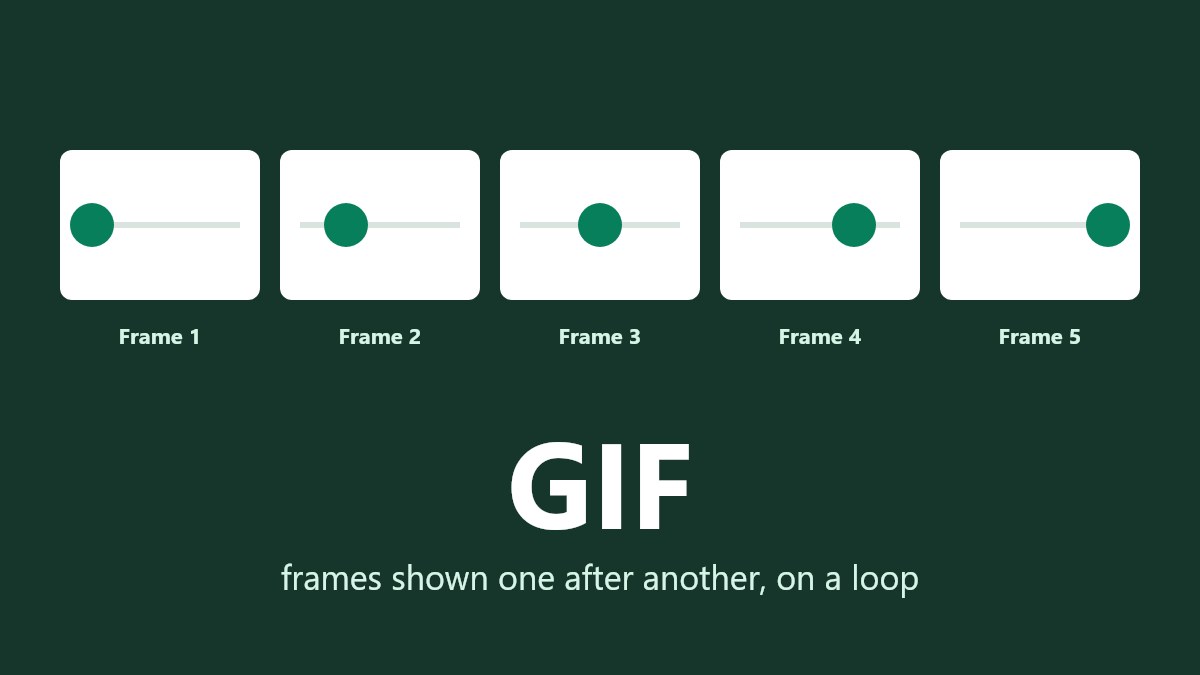
What is a GIF? A GIF is an image format which can contain a short animation. It can also be a static image. It stands for Graphics Interchange Format and date back to 1987.
The major limitation of a GIF is that it can only contain a maximum of 256 colors. This means they are great for creating simple graphics and short animations. However if you try to turn a photo or video clip into a GIF it can be quite pixelated and can become quite large. As seen in our tests, an animated photo lasting 2 seconds was 4,134KB as a GIF. However if it was converted into an animated WebP it would only be 692KB.
What Is a GIF File?
Short Answer
| Question | Answer |
|---|---|
| Can it animate? | Yes |
| Can it have sound? | No |
| How many colors? | Up to 256 |
| Does it lose quality? | Lossless compression, however photos will lose quality as they are reduced to 256 colors. |
| Can they be transparent? | Yes, although it can only be fully transparent. Each pixel will be either fully transparent or fully solid. |
| Where can they be used? | Almost every browser, chat application and forum. |
How Do GIFs Work?
A GIF contains a small range of colors and a number of pixels which reference a color from the palette. As explained by MDN's guide to GIF formats "each pixel in a GIF is represented by a single 8-bit value serving as an index into a palette." An 8-bit value can only be one of 256 numbers. This is why a GIF can only have up to 256 colors.
If the GIF is animated it will contain multiple frames and a set time delay between each frame. The delays are measured in hundredths of a second according to the GIF89a specification. Your browser will display them one after another and then repeat.
As the compression is lossless, it will compress the pixels without losing any information. However the quality loss occurs before the compression begins. This is due to the image having to be converted to only use 256 colors.
A GIF can be a bit confusing to pronounce. The creator said it is pronounced with a soft G like "jif." However many people pronounce it with a hard G like "gift."
What Happens to a Photo With 256 Colors?
A photo will usually have way more than 256 colors. Our test photo had 140,975 different colors. When converted to a GIF it was reduced to 255.
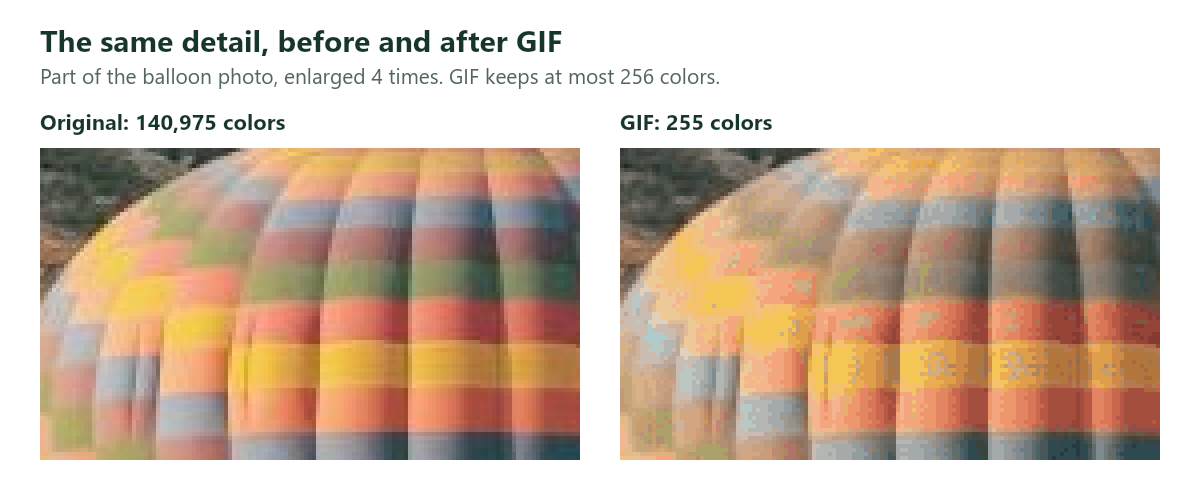
As there are only 255 colors to choose from, the GIF blends together dots of similar colors to create the illusion of the missing colors. This causes the image to appear pixelated.
The file size can also become an issue. The 1200 x 800 photo was 165KB when saved as a JPG (quality 80), 606KB when saved as a GIF and 1325KB when saved as a PNG.
The GIF was almost 4 times larger than the JPG and appeared worse. For a static photo a JPG would be the best option. Find out more about choosing between PNG and JPG.
Why Are GIFs So Large?
Animated GIFs can become large as they contain a picture for each frame. Often they will only contain the area which has changed. The compression doesn’t work well with photos and video clips as they are constantly changing throughout the whole image.
We created two 2 second animations. Each was 480 x 270 pixels containing 48 frames. We saved them as GIFs and animated WebPs.
| Animation | GIF | WebP (75) | Lossless WebP |
|---|---|---|---|
| Slow pan across photo | 4134KB | 692KB | 5509KB |
| Dot moving along line | 24KB | 24KB | 28KB |
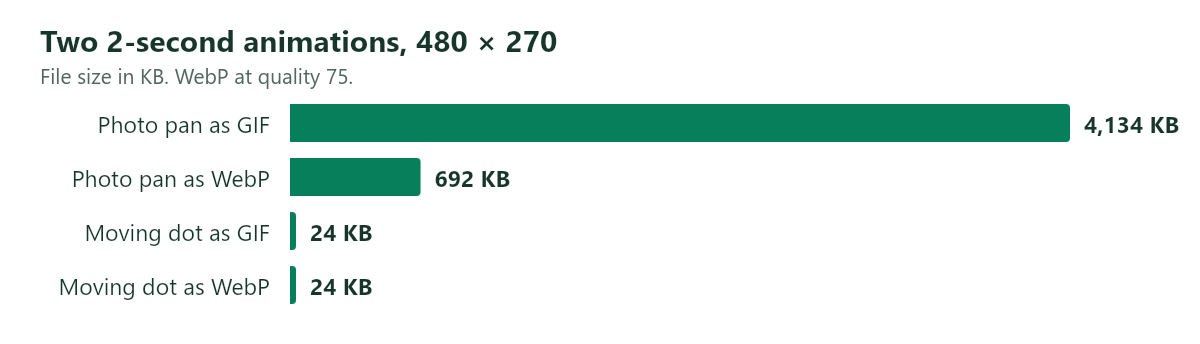
The photo was 6 times larger as a GIF. However the simple graphic was the same size. If you are looking to create a simple short animation with flat colors a GIF would be a good option. However if you are trying to create something that looks like a photo/video it will quickly become large.
The size and length of the animation will cause this issue. The longer the animation the more frames there are and the more data there will be. If you double the width and height there will be 4x more pixels in each frame. Find out why your image file is so large.
GIF vs Video
Usually videos will be much smaller than a GIF if you are trying to create a longer clip. For example Google’s web.dev team explain that "the initial GIF is 3.7 MB, compared to the MP4 version, which is 551 KB." They also maintain all the colors and can have sound.
However GIFs can still be useful. They can play by themselves and will automatically loop. They can also be used in places where videos cannot be played such as many forums and some chat applications. If you are trying to create a longer clip use video. If you want to create a short simple animation use a GIF.
GIF vs WebP and PNG
Animated WebPs can do everything a GIF can, but as seen in our test they are much smaller for anything that looks like a photo. They also support soft transparency. The downside is that not all forums, upload forms or older apps will accept anything other than GIFs. According to MDN’s guide you should consider using WebP, AVIF or APNG for animation. And PNG for static images.
PNG is a better lossless format for static images. It maintains all the colors and can have soft transparency.
| What you’re creating | Best option | Why |
|---|---|---|
| Short reaction or meme for chatting | GIF | Can be used anywhere and will automatically loop. |
| Animation for your website | Animated WebP or Video | Much smaller file sizes. |
| Longer clip | Video (MP4 etc.) | Much smaller file sizes with full colors and sound. |
| Static photo | JPG or WebP | Smaller and looks better than a GIF. |
| Logo or graphic with transparency | PNG | Smooth edges and full colors. |
Transparency in a GIF
A GIF can only have one color fully transparent. As MDN explains, pixels are opaque "unless a specific color index is designated as transparent." There is no option for semi-transparent pixels. This means you won’t be able to create soft shadows or smooth edges.
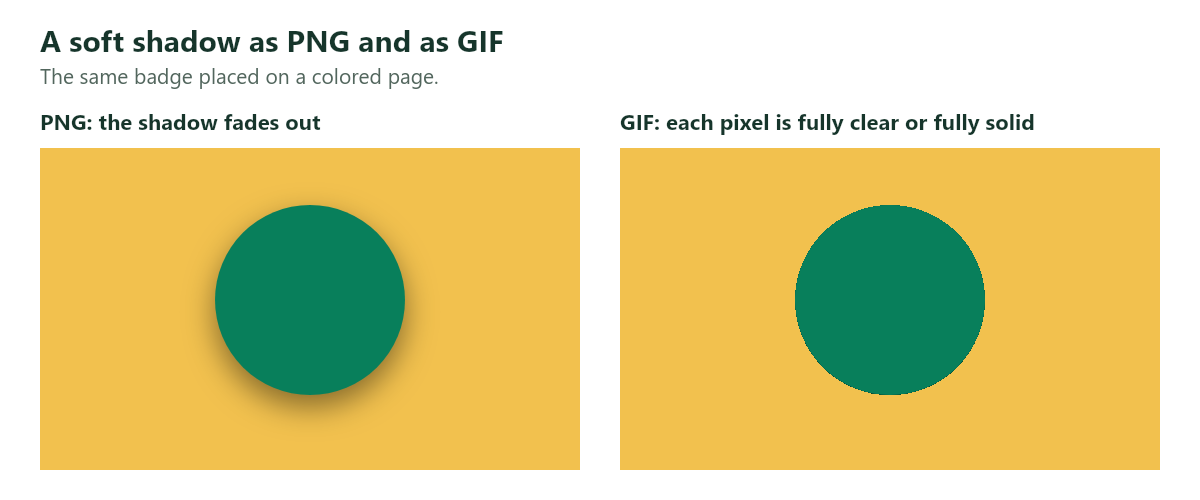
The PNG will keep the soft shadow. However the GIF can only have pixels as fully transparent or fully solid. This means there is no shadow and there are hard edges.
If your logo/sticker has a soft edge and will be placed on a colored background save it as a PNG or WebP.
How to Get a GIF From Another Format
Some applications and forums will ask you to upload a GIF. You can convert a static WebP using our WebP to GIF converter. This will run in your browser. However you should know that it will only convert the first frame of an animated WebP. This means you will have a static image. Also soft transparent edges will become hard as shown above.
To create an animated GIF from a video use a video application or GIF maker. Keep it short, narrow and simple in colors and it will be a reasonable size.
Frequently Asked Questions
What is a GIF used for?
Mainly for short looping animations. They are great for reactions in chats, simple demonstrations and small graphics on websites. They can be used almost anywhere which is why they are still used.
Is a GIF a video?
No. A GIF is an image file containing a series of frames. They do not have sound and cannot be paused or have playback controls like a video.
Is a GIF better than a PNG?
No. For static images a PNG is better as it contains all the colors and can have soft transparency. A GIF is only better if you need a simple animation that can be used anywhere.
Does a GIF lose quality?
Not from its compression, which is lossless. However photos will lose quality as they are reduced to 256 colors. Simple graphics with few colors will not lose any quality.
Why is my GIF so large?
It is likely that it is long, wide or contains lots of photo-like details. Try reducing the number of frames, width or colors. Or convert it to a video or animated WebP.
Summary
A GIF is an image format which is great for short silent animations. However it can only contain up to 256 colors. They are a great option for simple animations which need to be used anywhere but are not a good option for photos or video clips as they become large and pixelated. For static images use a JPG or PNG. For animations on your site use a WebP or Video.
If you need to convert a static WebP to a GIF use our WebP to GIF converter. This will run in your browser and your image will never be uploaded.

 Photo Stretcher
About Sabir Ali
Founder of Photo Stretcher
I built Photo Stretcher because resizing an image online usually means uploading it to a stranger's server and hoping for the best. Everything here runs in your browser instead: a stretcher, a resizer, a KB compressor, a converter. Your files never leave your device, and no pixel is invented by AI.
I review every guide on this site before it goes live. If a method stops working, I update the guide.