

PNG vs JPG: Which Should You Use?
When to use PNG and when to use JPG, with measured file sizes for photos and graphics, what each format does to quality, and what happens when you save again.
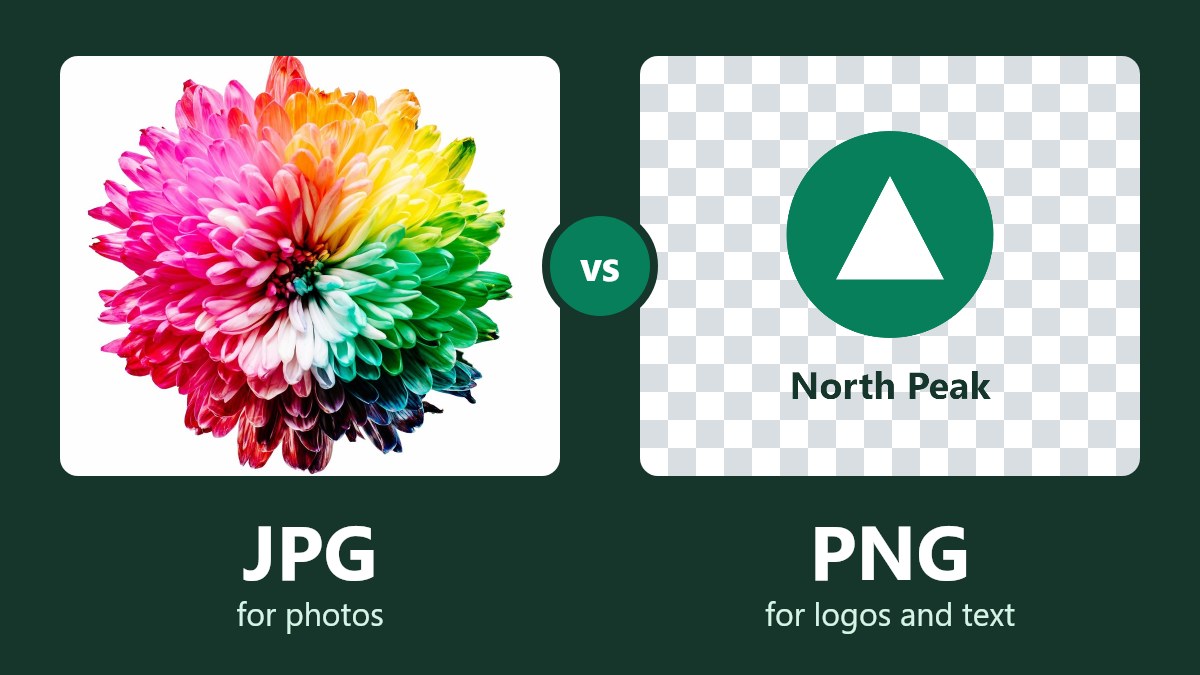
When you want to save an image, you will be prompted with a dialog asking if you want to save it as a PNG or a JPG. The quick answer to PNG vs JPG is to use a JPG for photos and a PNG for screenshots, logos, text and transparent backgrounds.
If you were to save a photo as a PNG, you could see that the file size increased by 8 times when we tested it. Whereas if we saved a screenshot as a JPG, you could see little white spots appear around text. Below you can find out which to use for your specific task, and how to change it if you have saved it incorrectly.
PNG vs JPG: A Quick Answer
| Task | Format | Reason |
|---|---|---|
| Add a photo to a website | JPG | Much smaller file size, little degradation |
| Send an email or upload to a form with a photo | JPG | Smaller file size, widely accepted |
| Save a screenshot/chart or image with text | PNG | Clear text and thin lines |
| Save a logo/icon with a clear background | PNG | JPG cannot save transparent backgrounds |
| Edit an image | PNG or your editor's own format | No degradation |
| Store many photos | JPG | Much smaller file size |
| Order prints of a photo | High quality JPG (unless told otherwise by your lab) | Widely accepted, much smaller file size |
What Is a JPG?
A JPG is the standard format used for photographs. It is a lossy format meaning that it reduces the file size by removing details that you are less likely to notice. The quality will affect how much is lost.
This is why you can easily share photos taken on your phone. However, once you have removed some details from the image, you cannot get them back. Also, you cannot save transparent backgrounds. As MDN's format guide says: "JPEG does not support an alpha channel."
If you searched for PNG vs JPEG, it's the same comparison. JPG and JPEG are the same format, and .jpg and .jpeg are both standard file extensions.
What Is a PNG?
A PNG (pronounced ping) is used for images that must be exact. It is a lossless format meaning that it will recreate the original data perfectly, no matter how many times you save it. It can also save transparent backgrounds, which is why logos and icons are often in PNG format.
However, it cannot remove any details meaning that detailed photos will be large.
How Much Larger Will a PNG Be?
This will depend on what is in your image. We have saved 6 images as both a PNG and a JPG (quality 80). 4 were sample photos, 1 was a screenshot and 1 was a logo we created for testing. The last 2 are simple graphics meaning that if you were to save a real screenshot with lots of photos, it would act more like a photo.
| Image | PNG File Size | JPG File Size (Quality 80) | PNG to JPG |
|---|---|---|---|
| Balloon Photo (1200 x 800) | 1,325KB | 165KB | 8.0x Larger |
| Lake Photo (1200 x 800) | 1,803KB | 227KB | 8.0x Larger |
| Vase Photo (900 x 1200) | 937KB | 103KB | 9.1x Larger |
| Waterfall Photo (800 x 1200) | 1,775KB | 223KB | 8.0x Larger |
| Logo (800 x 800) | 26KB | 16KB | 1.6x Larger |
| Screenshot (1200 x 800) | 66KB | 47KB | 1.4x Larger |
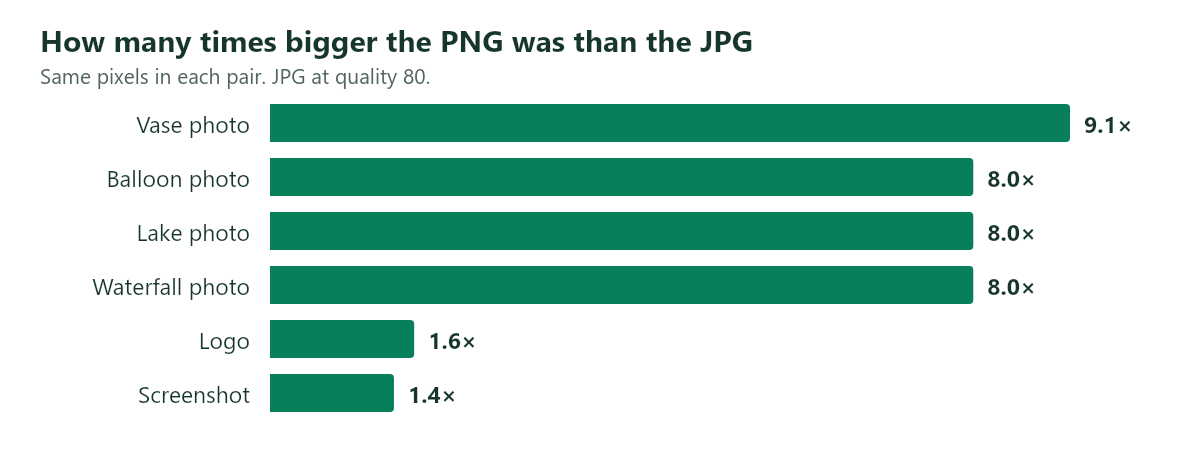
Photos have lots of small color changes, so PNG can't compress them much. Flat colors and simple backgrounds compress much better.
Overall, photos will have a large increase in file size whereas simple graphics will not. When we saved our screenshot at a quality of 95, it came to 73KB, which is larger than the PNG. If you are saving a graphic you can often get an exact copy of the image with a similar file size.
There could be many reasons why your file is larger than expected. Find out more in our guide to why your image file is so large.
Quality of JPG vs PNG
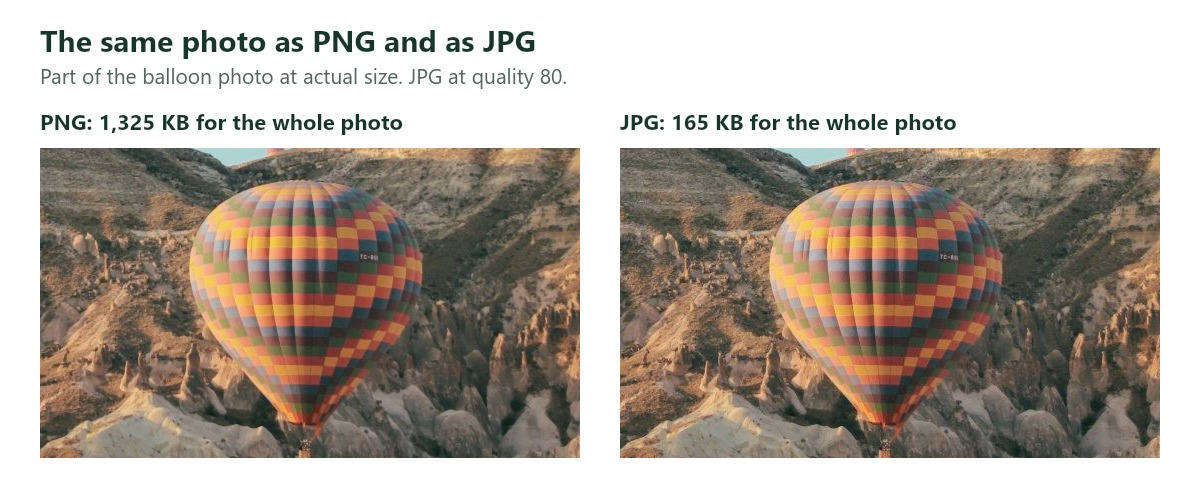
Usually you won't see a difference on a photo, even though 44% to 84% of the pixels in our 4 photos changed at a quality of 80. These changes are very small and are spread out over busy details meaning they do not look too bad when viewed at a normal size. There will be no changes to the pixels in the PNG however you will be using around 8 times more space for something you are unlikely to notice.
Text
As the text has clear edges on a simple background, you will see the changes.
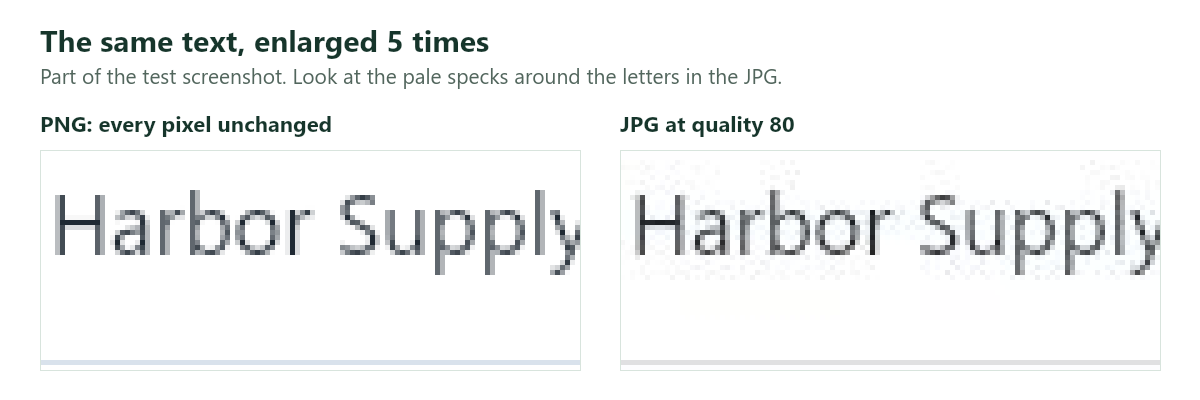
Even increasing the quality will not fully fix this issue. At a quality of 80, 41% of the pixels change. Increasing the quality to 95 still means 40% of pixels change. If your image is mostly text, save it as a PNG.
When to Use Which Format
PNG vs JPG for websites
Use both! Use a JPG for photos and a PNG for logos, icons and graphics with text. Avoid saving a large photo as a PNG as large images will make your page slower. If your website can use WebP, you may want to look into this.
Emails and upload forms
Use a JPG for photos. This will keep your attachments small and is almost universally accepted. If you get an error saying your photo is too large to upload to a form, follow our guide to photo upload errors.
Editing
Use a PNG or your editor's own format. Only convert to a JPG when you are finished.
We saved the balloon photo as a JPG 10 times (quality 80). The similarity to the original image was measured using a score (the higher the score the more similar). The score only dropped from 42.9 to 42.7. However, if we cropped 1 pixel from the edge of the image each time (as you might if you were making a small change) the score drops to 29.9.
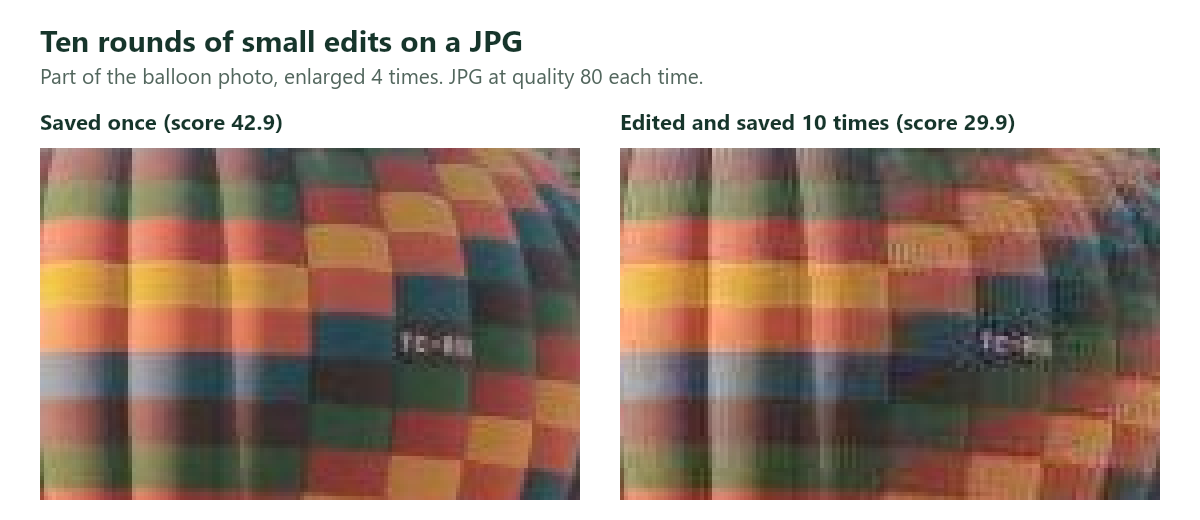
This means that saving an image multiple times does not cause too much of an issue however if you are editing and saving it, it will. If we saved the image as a PNG 10 times there were 0 changes to the pixels.
Storing many photos
JPGs will save you a lot of space. If you had 1000 files the size of our balloon photo, they would be around 161MB whereas they would be 1.3GB if they were PNGs. However, if the photo is important to you, save your best original, because you cannot get the lost details from a JPG back.
PNG vs JPG for printing
For standard photo printing, a high quality JPG is the safest option. However, printing shops have their own rules. Check with yours. For example, Pro Lab accepts both but recommends sending maximum quality JPGs in sRGB. It suggests using a PNG for graphics, logos and icons.
If you have a printed item with small text or crisp line art, a PNG is a great option if your printing shop will accept it. However, if your commercial printer requires CMYK colors, you will not be able to use a PNG. There is no CMYK option in a PNG. Ask them what file type they want.
We have measured file sizes rather than ink on paper so we cannot tell you how much difference you would see in print.
Logos and transparent images
Use a PNG. A JPG cannot save transparent areas so they will be filled with a solid color. The Image Resizer will warn you and fill them with white.
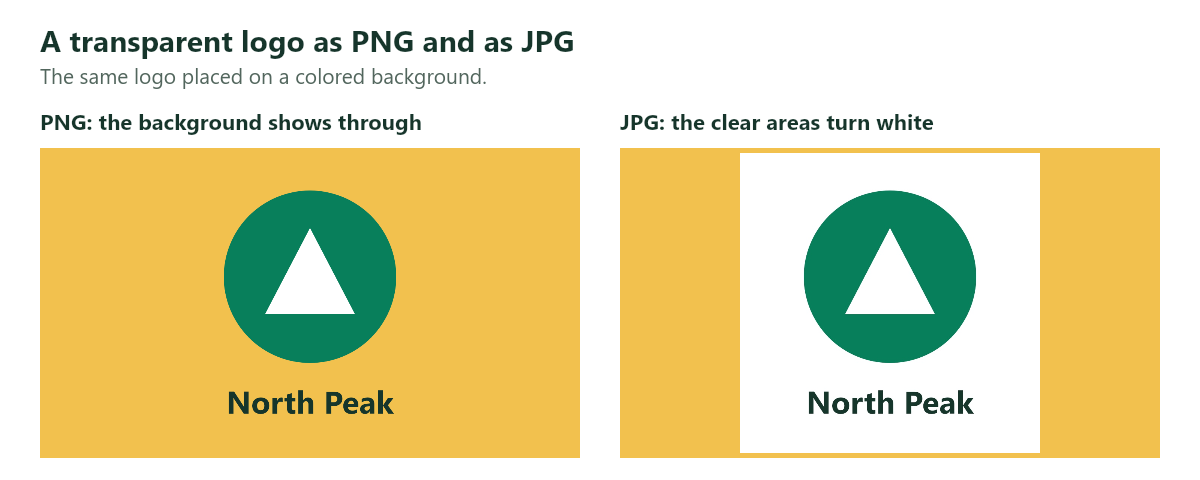
If you have your logo in vector format, save this too. An SVG will remain crisp no matter what size. See vector vs raster for when to use each. If you want a solid color background behind your picture, you can add some padding in your desired color.
How to Convert a PNG to a JPG (or Vice Versa)
This can be done in your browser.
- Go to the Image Resizer. Drag your file into the box. This accepts JPG, PNG and WebP.
- Leave the width and height as they are unless you want a smaller image.
- Choose JPEG or PNG. If you want to convert to a JPG choose a quality of around 80.
- Check the new file size in the preview and download. Your original file will not be changed.
However, if you are converting a JPG to a PNG you will not be able to get the lost details back. Our 165KB JPG became 1,388KB. The similarity score remained exactly the same (42.9). You will have a file that is over 8 times larger with the same damage. Only convert to a PNG if specifically asked to.
Common Mistakes
- Saving photos as a PNG for better quality. You will rarely notice a difference and your file could be 8-9 times larger.
- Saving a screenshot/text as a JPG. This is what causes the white spots around text.
- Saving a transparent logo as a JPG. The transparent background will become a solid color.
- Editing and saving the same JPG repeatedly. Use a PNG or original.
- Converting a JPG to a PNG to improve it. This will make your file larger and the image will remain the same.
What About WebP?
WebP can be lossy or lossless. It can also save transparent images meaning it can do both jobs. Often it will be a smaller file size. See our guide to making your image smaller to compare to a JPG. If your website/app can use WebP you can convert using the PNG to WebP or JPG to WebP converter. However, if you are sending it to a form/print shop or someone with software that may not open WebP, stick with JPG/PNG.
Frequently Asked Questions
Which is better, JPG or PNG?
It depends on your image. JPGs are better for photos as they are much smaller. PNGs are better for text, graphics and transparent images as there are no changes.
Is PNG higher quality?
PNGs are more accurate as they keep all the pixels the same. However, this does not always make a noticeable difference. At a sensible quality for JPGs, the photo will look the same at a normal viewing size.
Does converting a PNG to a JPG lose quality?
Yes. JPG changes the pixels when saving. Usually at a quality of 80 or above there will not be much of a difference to a photo. However there can be changes around text.
Why is my PNG so large?
It is likely to be a photo or have lots of fine detail. As PNG cannot remove anything, all of this detail will take up space. If it does not need a transparent background, save it as a JPG/WebP.
Are JPG and JPEG different?
No. They are the same format but spelled differently. Both file types will work.
The Short Version
Save photos as a JPG, and save screenshots, logos and anything transparent as a PNG. If you are still editing, keep a PNG or your editor's own file and export a JPG at the end.
Saved the wrong one? Open it in the Image Resizer, pick the format you need and check the new size before you download. It works in your browser, and your image is never uploaded.

 Photo Stretcher
About Sabir Ali
Founder of Photo Stretcher
I built Photo Stretcher because resizing an image online usually means uploading it to a stranger's server and hoping for the best. Everything here runs in your browser instead: a stretcher, a resizer, a KB compressor, a converter. Your files never leave your device, and no pixel is invented by AI.
I review every guide on this site before it goes live. If a method stops working, I update the guide.