

What Is DPI? A Plain Guide for Photos and Printing
What DPI means, what the DPI number in a photo really changes, how many pixels a print needs, and why DPI hardly matters on the web.
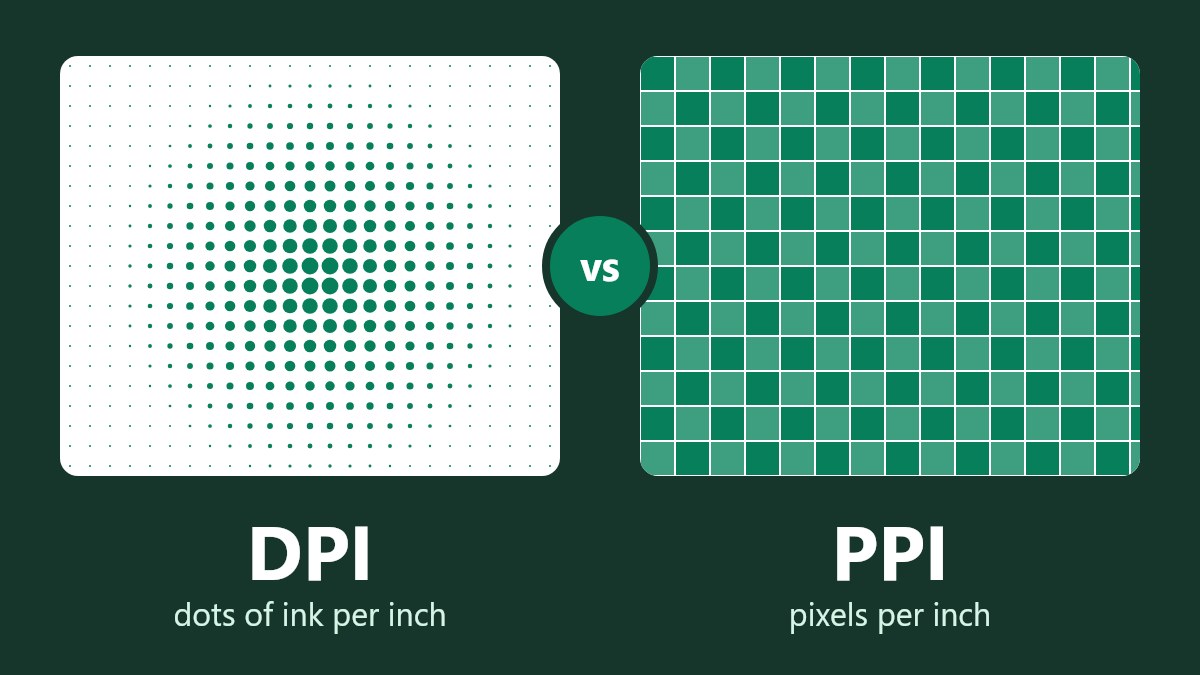
What is DPI? DPI stands for dots per inch. This will show you how many ink dots the printer will use inside every inch of paper. When using an image file the DPI value will be used to determine how large to print the image. This does not affect your image.
Most people don’t understand that the DPI of the image file doesn’t affect the image. We saved one image with a DPI of 72, 300 and 600. The number of pixels and file size are identical between the images. The only thing different was the print size.
This guide will help to explain what DPI means for you, what DPI you should use for your prints and how to edit without affecting your image.
What DPI Means in Different Places
Depending on where you see a DPI value it can mean different things.
| Where you see it | What it means | Does it affect your image? |
|---|---|---|
| Image File Information | It determines how large to print your photo. | Doesn’t affect image. |
| Printer Specs | How detailed the printer will place the ink. | Doesn’t affect image. |
| Print Shop Spec | Determines how many pixels the print shop wants per inch. | Only affects image if adding/removing pixels. |
| Scanner Spec | Determines how many pixels to scan per inch of paper. | Affects image. |
| Computer Mouse | Determines how far the cursor will move. | Not related to images. |
What Is the Difference Between DPI and PPI?
PPI means Pixels Per Inch. This relates to an image or screen. DPI means Dots Per Inch. Strictly speaking this refers to how many ink dots the printer will use. Each pixel will be made up of many small dots of ink.
In regular use however, these terms are often confused. When referring to photos, applications, forms and print shops will often refer to 300 DPI. This actually means 300 pixels per inch. When asked for a 300 DPI photo it will almost always be this. This guide will refer to DPI like this.
What Does the DPI Do?
An image is made up of a grid of pixels. The DPI value tells you how densely packed the pixels will be when you print your image. Simply divide the number of pixels by the DPI value to give you the print size.
We took an image that was 1200 x 800 pixels and saved it 3 times. Each time we had identical pixels and file sizes. However, we had different print sizes.
| DPI Value | Pixels | File Size | Print Size |
|---|---|---|---|
| 72 | 1200 x 800 | 279KB | 16.7 x 11.1 Inches |
| 300 | 1200 x 800 | 279KB | 4.0 x 2.7 Inches |
| 600 | 1200 x 800 | 279KB | 2.0 x 1.3 Inches |
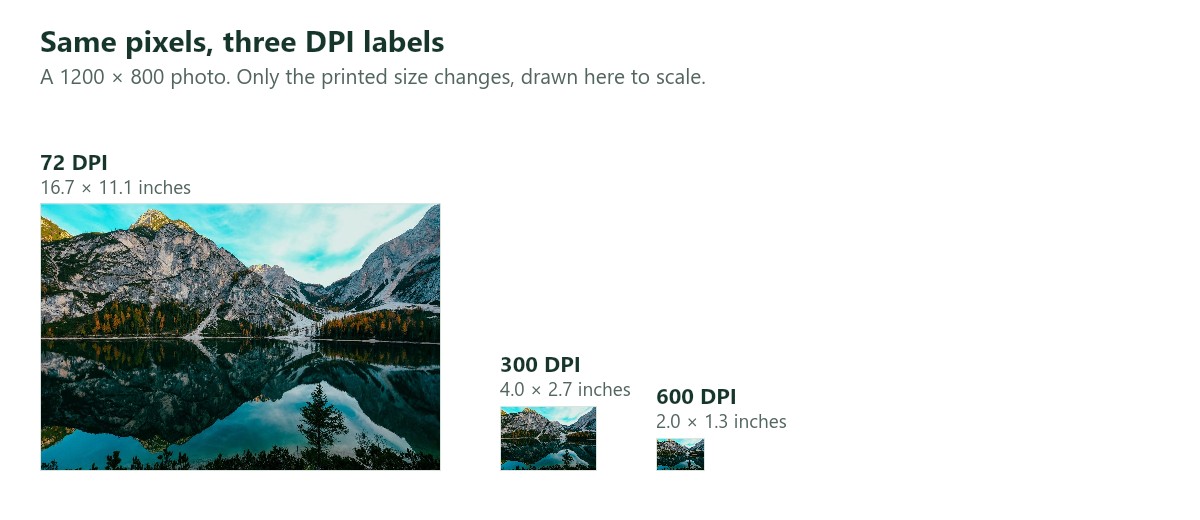
Changing the DPI of your image to 300 will not make it look crisp on screen or reduce the file size. See our guides on reducing Image Size and aspect ratio vs resolution for information on what will change your file.
What DPI Should I Use?
If you’re printing your photos you’ll generally aim for 300 DPI. This makes the pixels too small to see at reading distance. To find out how many pixels you need multiply the height and width by 300.
| Print Size (Inches) | Pixels | Megapixels |
|---|---|---|
| 4x6 | 1200 x 1800 | 2.2 |
| 5x7 | 1500 x 2100 | 3.2 |
| 8x10 | 2400 x 3000 | 7.2 |
| 11x14 | 3300 x 4200 | 13.9 |
| 16x20 | 4800 x 6000 | 28.8 |
Large prints are a bit different. Posters and banners are viewed from further away so can often be printed with a lower DPI. Print shops will have their own minimum DPI requirement so be sure to check what they require.
If you have a smaller image than in the table you can either print a smaller size or be happy with a less crisp print. If you increase the DPI to 300 by adding pixels in a resizer you will have a larger file. However, you cannot add any extra detail as the camera didn’t pick this up. You will get a warning in the Image Resizer.
There are standard print sizes so a 4x6 and 8x10 will crop your image differently. Use the Aspect Ratio Calculator to calculate the ratio of the shape or calculate how long the missing side is for whatever ratio you want.
Does DPI Matter for the Web?
Hardly ever. Web pages use the pixel size to determine how large your image will be. A 1200 pixel wide image will be the same size whether it has a DPI of 72 or 300. Browsers can only use the resolution information in a very specific situation. Just ensure you have the pixel width you want.
The old advice of saving images for the web at 72 DPI comes from older screens. The standard now is not to do this. The W3C CSS spec defines 1 CSS inch to be 96 pixels. The important thing for the web is how many pixels wide you are uploading and what the file size is.
Most upload forms will be the same. If they ask for a pixel or KB size then the DPI won’t affect whether your image is accepted. See our guide on digital passport photo requirements to see what they look for.
How to Check and Change DPI
How to check
On Windows Right Click > Properties > Details. Look for Horizontal resolution. On Mac Open in Preview > Tools > Adjust Size.
How to change without affecting image
You can safely change the DPI value. This will not affect the pixels. Open the image in GIMP (a free editor). Go to Image > Print Size. This will not change the number of pixels in your image (GIMP Documentation). In Photoshop go to Image Size and uncheck Resample.
How to change the pixels
If you need more or fewer pixels this is resizing. Use the print size table to calculate how many pixels you need. Be sure to keep your original image as reducing the image will lose pixels forever.
Scanning
Scanning is the one time DPI changes the image itself. Scanners take in paper so the DPI value will determine how many pixels are taken in per inch. A 6 inch wide image scanned at 300 DPI will be 1800 pixels wide. Scanned at 600 DPI it will be 3600 pixels wide giving you more detail.
If you want to enlarge your scan then scan at a higher DPI. If you just want to send it via email or the web then 300 DPI is usually enough.
Computer Mouse
If you came here because you’re having issues with your mouse then DPI will mean something different. This is how far your cursor will move for every inch you move your mouse. A high DPI will make your cursor move further with less movement. This is unrelated to photos and printing.
Frequently Asked Questions
Is 300 DPI better than 72 DPI?
When printing 300 DPI will shrink your image and make it crisper. On screen you generally will not notice any difference.
How do I make my picture 300 DPI?
If your image has enough pixels for the print size you want then just change the DPI value. Ensure you uncheck resample. If your image does not have enough pixels then print it at a smaller size. Increasing it to 300 DPI will not add any real detail.
Will changing the DPI affect the file size?
No. In our example the file size was identical at 279KB for all 3 DPI values. To reduce your file size you’ll need to reduce the number of pixels or quality.
What DPI is a photo taken on my phone?
This will depend on your phone and application but it doesn’t really matter. The important thing is how many pixels there are. A typical 12MP phone photo will have enough pixels to print a crisp 8x10 at 300 DPI.
Is DPI the same as resolution?
Often these terms are used interchangeably but resolution usually refers to the pixel size of a photo (e.g. 1200 x 800 pixels). DPI just refers to how densely packed the pixels are.
Summary
DPI is a print setting. It will determine how large the image will be when printed. It will not affect the pixels or file size and will generally not affect how it looks on screen.
For printing aim for 300 DPI. Be sure you have enough pixels for the size you want. For the web ignore DPI and just look at the pixel size and file size.
If you need your photo to be a certain number of pixels open it in the Image Resizer. This will let you preview what it will look like before downloading. It will run in your browser and your image will never be uploaded.

 Photo Stretcher
About Sabir Ali
Founder of Photo Stretcher
I built Photo Stretcher because resizing an image online usually means uploading it to a stranger's server and hoping for the best. Everything here runs in your browser instead: a stretcher, a resizer, a KB compressor, a converter. Your files never leave your device, and no pixel is invented by AI.
I review every guide on this site before it goes live. If a method stops working, I update the guide.