

What Is an SVG File? How It Works, When to Use It and How to Open One
What an SVG file is, what's written inside one, how to open and edit it, and how to fix an SVG that won't show, scale or upload.
What is SVG? SVG is an image format that stores a picture as written instructions instead of pixels. The file might say "draw a green circle here," and your screen draws it at whatever size you need, so an SVG logo stays sharp when you enlarge it.
Any modern web browser can open one. Many upload forms, photo apps and email programs can't, and the usual fix is to export the image as a PNG.
Quick Answer
| Question | Answer |
|---|---|
| What does SVG stand for? | Scalable Vector Graphics |
| File extension | .svg |
| What's inside the file? | Text, written in XML |
| Best for | Logos, icons, charts and simple illustrations |
| Not for | Photos |
| Does it blur when enlarged? | No, as long as it contains real shapes |
| Can it be transparent? | Yes |
| Can it be animated? | Yes |
| Opens in | Every modern browser, and vector editors such as Inkscape |
| Best fix when it isn't accepted | Export it as a PNG |
What Does SVG Stand For?
SVG stands for Scalable Vector Graphics. "Vector" means the picture is made of shapes, and "scalable" means those shapes can be drawn at any size. For how this compares with a pixel image, see vector vs raster.
SVG is an open web standard. The World Wide Web Consortium published version 1.0 in September 2001, and MDN describes it as an XML-based markup language for two-dimensional vector graphics.
How Does an SVG File Work?
Open an SVG in Notepad or TextEdit and you can read it. We wrote a small icon by hand: a green circle, a white mountain and a yellow sun. The whole file is five lines and 228 bytes.
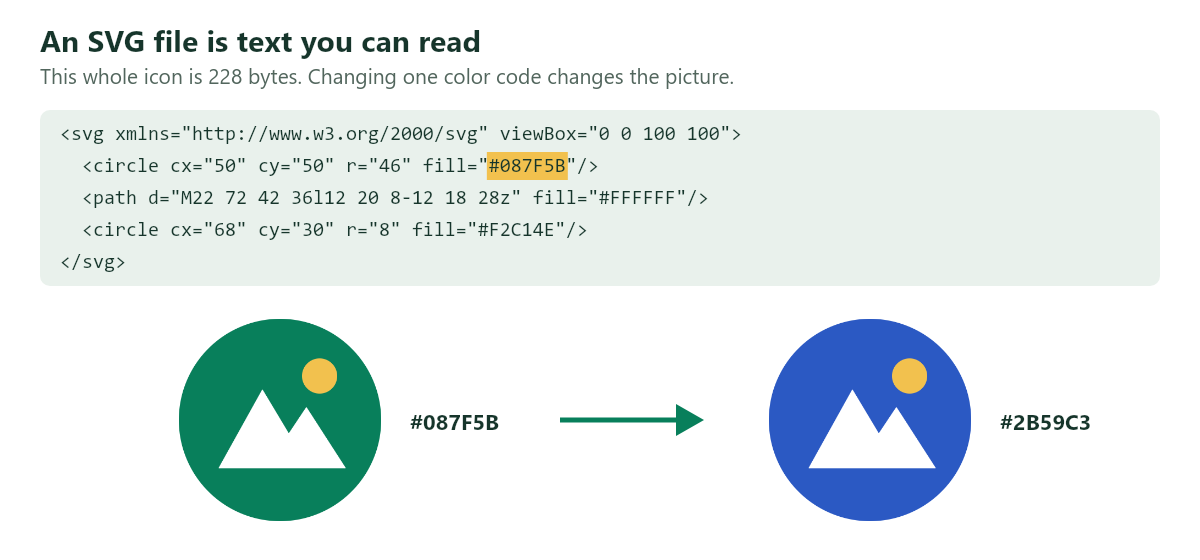
Each line draws one shape, in order. Then we changed a single color code in that text, from #087F5B to #2B59C3, and saved the file. The circle turned blue and nothing else moved. You can do the same with a simple logo, without opening a design program.
SVG vs PNG
SVG stores shapes, and PNG stores pixels. The right one depends on the picture and where it's going.
| What you need | Use | Why |
|---|---|---|
| A logo or icon on a website | SVG | One small file works at every size |
| A chart or simple illustration | SVG | Lines and text stay sharp |
| A screenshot | PNG | A screenshot is already made of pixels |
| A logo for a form, email or social post | PNG | SVG often isn't accepted |
| A photo | JPG or WebP | A photo has too much detail to draw as shapes |
We measured the size difference in our vector guide. One simple logo was 0.2 KB as an SVG and 203 KB as a PNG 3,200 pixels wide. A drawing made of 20,000 circles went the other way: 1,050 KB as an SVG and 433 KB as a JPG at 1,000 × 1,000. The more shapes a picture needs, the less SVG saves.
For photos, the choice is between pixel formats. See PNG vs JPG and what a WebP file is.
Is Every SVG File a Vector Image?
No. An SVG can also hold an ordinary photo, and the file name won't tell you. Some converters turn a JPG or PNG into an "SVG" by placing the pixels inside the file. It ends in .svg, but it blurs when you enlarge it, like the photo it came from.
It also gets larger. We took a 1200 × 800 photo and placed it inside an SVG, first as a JPG and then as a PNG:
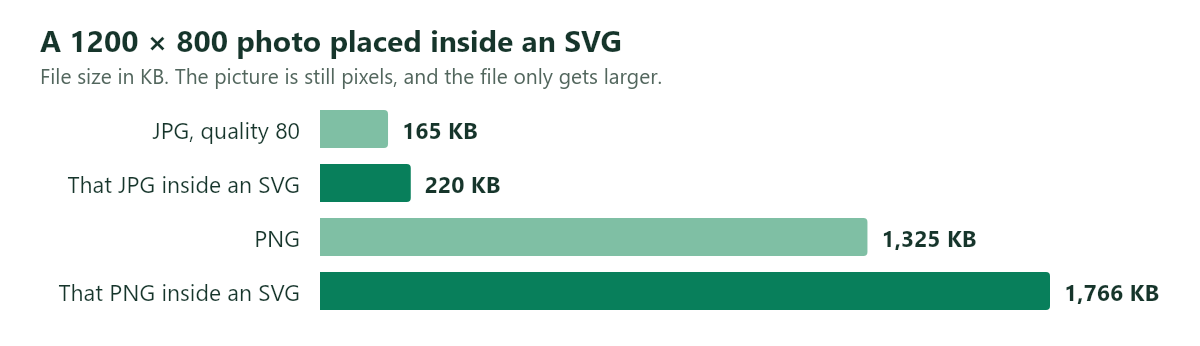
Both grew by a third, because pixels have to be rewritten as text to fit in an SVG. The SVG option in our own Image Converter works this way too, so use it only when a program insists on an .svg file. It won't make the image sharper.
To examine a file
Open it in a text editor. Lines that start with path, circle or rect are real shapes. One huge block of letters after "data:image/png" or "data:image/jpeg" is a photo.
How to Open an SVG File
On Windows, Mac or Chromebook
Drag the file into Chrome, Edge, Firefox or Safari. According to Can I use, all four have shown SVG images for years.
On iPhone, iPad or Android
Open it in your browser. Safari on iPhone and iPad has supported SVG images since iOS 9.
To edit the shapes
Use a vector editor. Inkscape is free and works on Windows, Mac and Linux. A photo editor usually turns the SVG into pixels when it opens it.
To change a color or a word
Open the file in Notepad or TextEdit, find the color code or the text, change it and save. Keep a copy of the original first.
How to Convert an SVG to PNG
Open the SVG in a vector editor such as Inkscape and export it as a PNG at the width you need. Our vector guide has the steps to export an SVG to PNG. Export at the largest size you'll use, because a PNG blurs when you enlarge it later.
Our converter and resizer don't open SVG files. Once you have the PNG, you can change its size with the Image Resizer.
Common SVG Problems and How to Fix Them
| What happens | What it usually means | What to do |
|---|---|---|
| A form says the file type isn't allowed | The form accepts only JPG or PNG | Export the SVG as a PNG |
| The browser shows code instead of a picture | The file is missing its xmlns line | Add xmlns="http://www.w3.org/2000/svg" to the first tag |
| The picture is a broken icon on your web page | The file name is wrong, or the xmlns line is missing | Check the path, then check the first tag |
| The drawing stays small in a bigger frame | The SVG is missing its viewBox | Add a viewBox that matches its width and height |
| The text is in the wrong font | The font isn't on that device or isn't stored in the file | Convert the text to paths in your editor |
| The image blurs when you enlarge it | There's a photo inside the SVG | Locate or redraw the original vector image |
| It won't show in an email | The email program doesn't support SVG | Send a PNG |
We tested the xmlns and viewBox problems in Microsoft Edge. We also checked what happens when an SVG contains a script.
Missing xmlns
We deleted the xmlns part from our icon and changed nothing else. On a web page the image didn't load. Opened directly, Edge printed the code with the message "This XML file does not appear to have any style information associated with it."
Missing viewBox
We pasted a 200 × 200 icon into a page and set it to 400 pixels wide. With a viewBox, the drawing filled the frame. Without one, the frame doubled and the drawing stayed at its old size.
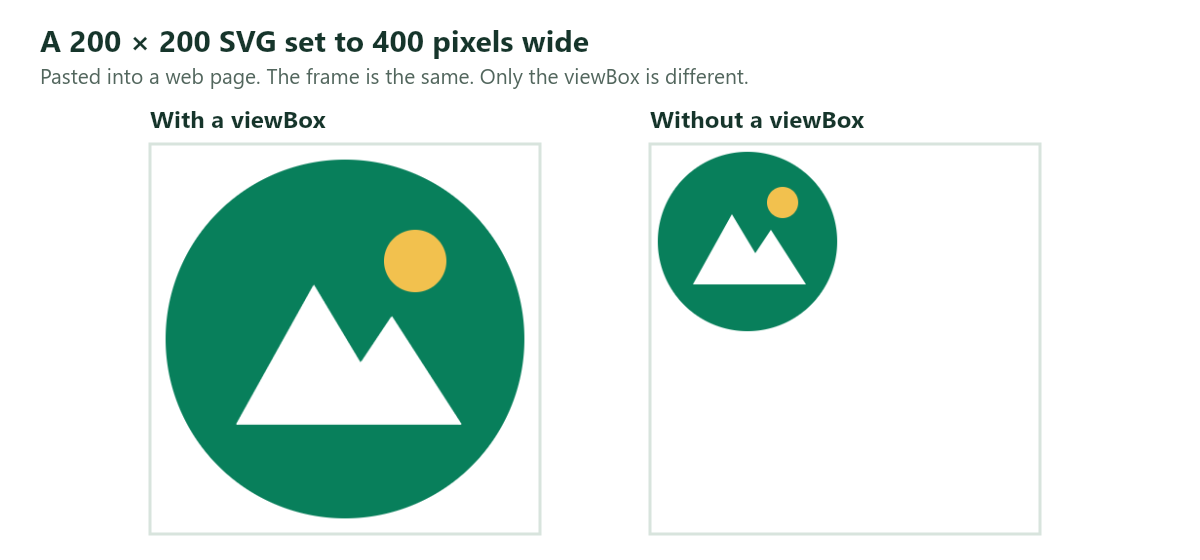
When we loaded the same two files with an img tag instead, Edge scaled both correctly. So if an SVG only misbehaves when its code is pasted into a page, check the viewBox first.
Scripts inside the file
An SVG can contain code as well as shapes. We added a short script that turns the circle red. Shown with an img tag, the icon stayed green, because browsers disable scripts in SVG images. Opened directly in a tab, the script ran.
Why Do Some Websites Refuse SVG Files?
The script test shows one reason. An SVG can carry code that runs when someone opens it, so a site that accepts files from strangers takes a risk. WordPress, for example, leaves SVG out of its default list of file types.
Other forms need pixels, for example because they check the photo's width and height. Upload a PNG or JPG instead. If the form still refuses it, our guide to photo upload errors covers the other causes.
Should I Use SVG on My Website?
For logos, icons and charts, yes. Browsers support it, the files are usually tiny, and Google Search supports SVG images.
Only use SVG files you made or got from a source you trust. Use PNG for images you send by email, since support varies between email programs. For photos, use JPG or WebP. For a short animation that has to work in chat apps, a GIF is still the safer choice.
Frequently Asked Questions
Is SVG better than PNG?
For logos and icons on a website, usually yes. It stays sharp at every size and the file is small. PNG is better for screenshots and for anything you upload to a form, email or post.
Why does my SVG open in a web browser?
Because browsers can draw SVG and many photo apps can't, so your device hands the file to the browser. Nothing is wrong with the file.
Why am I seeing code instead of an image?
If you opened the file in Notepad or another text editor, that's what an SVG normally looks like, so open it in a browser instead. If the browser shows code too, the file is probably missing its xmlns line. The problems table above has the line to add.
Can I convert a JPG to SVG?
You can, in two different ways. Placing the JPG inside an SVG keeps the pixels and makes the file larger. Tracing it in a vector editor creates real shapes, which works for simple logos and poorly for photos.
Can I rename a .png file to .svg?
No. Renaming changes the name but not the data inside, so programs will fail to read it.
Are SVG files safe to open?
An SVG made only of shapes has nothing to run. But the format can also hold a script, and in our test that script ran when we opened the file directly in a browser. Treat an SVG from someone you don't know the way you'd treat a web link from them.
Summary
SVG is an image format made of text instructions. Use it for logos, icons and charts, because one small file stays sharp at every size. Don't use it for photos. In our test, an SVG with a photo inside was a third larger than the photo, and it's no sharper.
To view an SVG, open it in a browser. To edit it, use a vector editor. If a form or email program refuses it, export a PNG and keep the SVG as your original.

 Photo Stretcher
About Sabir Ali
Founder of Photo Stretcher
I built Photo Stretcher because resizing an image online usually means uploading it to a stranger's server and hoping for the best. Everything here runs in your browser instead: a stretcher, a resizer, a KB compressor, a converter. Your files never leave your device, and no pixel is invented by AI.
I review every guide on this site before it goes live. If a method stops working, I update the guide.