

What Is a WebP File? Why Images Save as WebP and How to Open Them
What a WebP file is, why saved images end up as WebP, how much smaller it is than JPG and PNG in our tests, and how to open or convert one.
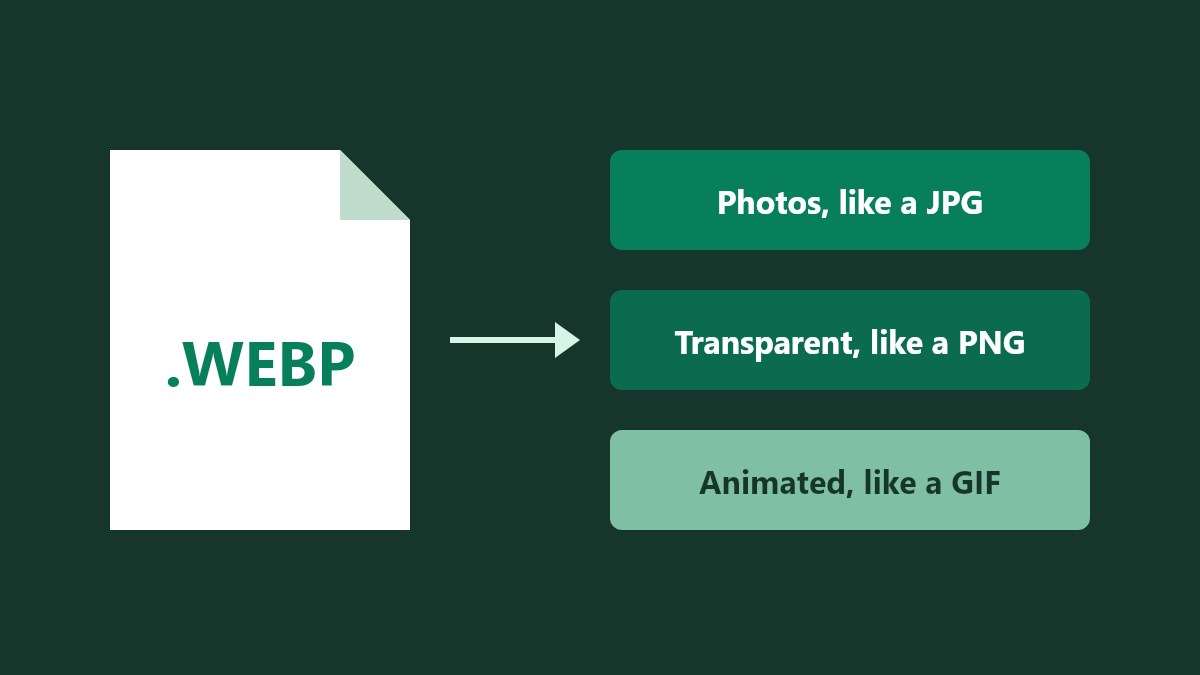
What is WebP? WebP is an image format made by Google to make images on the web smaller. A WebP file can hold a photo like a JPG, a transparent graphic like a PNG, or a short animation like a GIF, usually in less space than any of them.
That's why so many websites use it, and why images you save from the web often end up as .webp files. Most browsers open them, but some older apps, editors and upload forms don't. The quickest fix is to convert the image to JPG or PNG.
Quick Answer
| Question | Answer |
|---|---|
| What is it? | An image format from Google, first announced in 2010 |
| File extension | .webp |
| Can it hold photos? | Yes, with lossy compression like JPG |
| Can it be transparent? | Yes, like PNG |
| Can it be animated? | Yes, like GIF |
| Smaller than JPG? | Usually. In our test, 22 to 26% smaller at the same quality. |
| Opens in | Chrome, Edge, Firefox and Safari 14 or later |
| Doesn't work in | Some older apps, editors and upload forms |
| Best fix when it won't open | Convert it to JPG or PNG |
Who Made WebP?
Google announced WebP in September 2010 as part of its work to make the web faster. It's built on the compression from VP8, a video format Google had made open source earlier that year.
Today it's an open format that any app or website can use for free.
How Does WebP Work?
WebP can save an image in two ways:
- Lossy. It throws away detail you're unlikely to notice, like a JPG does. This is the usual choice for photos.
- Lossless. It keeps every pixel exactly, like a PNG does. This suits logos, screenshots and graphics.
Both kinds can be transparent, and both can be animated. None of the older formats does all of that: a JPG can't be transparent, a PNG can't be animated, and a GIF is limited to 256 colors.
According to Google, lossless WebP images are 26% smaller than PNGs, and lossy WebP images are 25 to 34% smaller than comparable JPGs at the same visual quality. We tested both claims.
WebP vs JPG: Which Is Smaller?
We took three sample photos, saved each as a JPG at quality 80, then saved it as a WebP at the lowest quality that looked at least as close to the original. To judge "looked as close," we used SSIM, a standard score of how similar two images are (1 means identical).
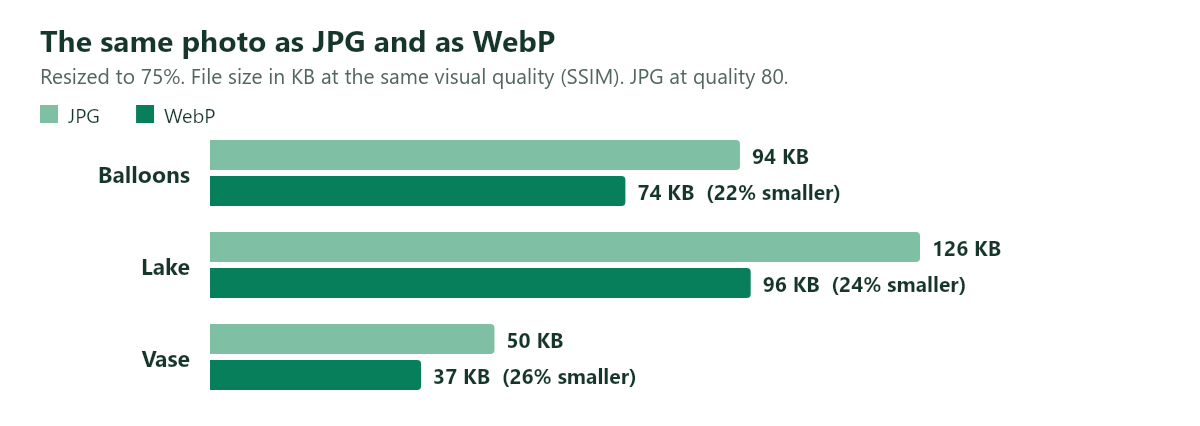
| Photo | JPG (quality 80) | WebP | WebP is |
|---|---|---|---|
| Balloons, 900 × 600 | 94 KB | 74 KB | 22% smaller |
| Lake, 900 × 600 | 126 KB | 96 KB | 24% smaller |
| Vase, 675 × 900 | 50 KB | 37 KB | 26% smaller |
So WebP saved about a quarter of the size, a little under Google's 25 to 34%.
Saving from JPGs gives less reduction in size
Our sample photos were already JPGs, and when we compared them at their original size, without resizing, WebP needed more space than JPG to match its quality. The JPG's own compression pattern was already baked into the photo, and a new JPG fits that pattern better than WebP does.
We also converted each sample JPG, as it was, to WebP at quality 85 (our converter's default). The WebP files were 6%, 14% and 27% smaller than the JPGs, and each conversion adds a second round of compression.
If you want the full saving, make the WebP from the original photo, or resize it at the same time. Converting a finished JPG still usually helps, just less than the headline numbers suggest.
WebP vs PNG: Which Is Smaller?
For images that must stay exact, lossless WebP did better than Google's 26%. Saved losslessly, our three photos were 38 to 42% smaller as WebP than as PNG.
The gap was even bigger for a simple graphic. We saved a 1000 × 1000 graphic with a transparent background three ways:
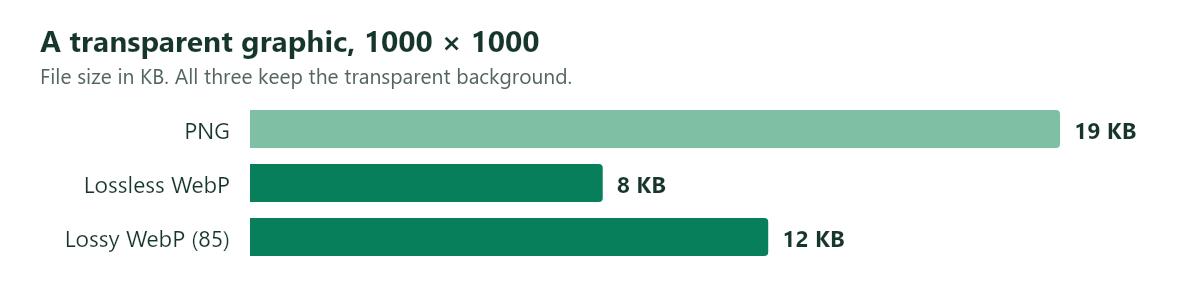
The lossless WebP was 56% smaller than the PNG, and it kept the transparent background exactly. For a logo or icon on a website, that's a free saving. For which of the two classic formats to use elsewhere, see PNG vs JPG.
WebP vs GIF
For animations, WebP is usually far smaller. In our guide to GIFs, a 2-second photo animation was 4,134 KB as a GIF and 692 KB as an animated WebP. A simple animation with flat colors was about the same size in both.
GIF still has one advantage: almost every chat app, forum and upload form accepts it. Animated WebP isn't accepted everywhere yet.
Why Do Images Save as WebP?
When your browser asks a website for an image, it tells the site which formats it can show. Chrome and Firefox both list WebP, as MDN's list of browser Accept headers shows. Many sites then send the smaller WebP version instead of a JPG or PNG.
So when you right-click and choose "Save image as," you save the file the site sent you, which is the WebP. The image may have started as a JPG, but the copy on your computer is WebP.
Common WebP Problems and How to Fix Them
| What happens | What it usually means | What to do |
|---|---|---|
| A saved image is .webp instead of .jpg | The website sent your browser a WebP version | Convert it to JPG |
| The image won't open on Windows | The Photos app is missing the WebP extension | Install the free WebP Image Extension, or convert it to JPG |
| An older editor or app won't open it | The app doesn't support WebP | Convert it to PNG or JPG first |
| A website or form says the file type isn't allowed | The form accepts only JPG or PNG | Convert it to JPG |
| The background turns white after converting to JPG | JPG can't be transparent | Convert to PNG instead to keep the transparency |
| An animated WebP becomes a still image | Many converters, including ours, keep only the first frame | Use a video or GIF maker for the animation |
| A very large image won't save as WebP | WebP is limited to 16,383 pixels on each side | Resize it, or save it as JPG or PNG |
We checked that last limit ourselves. A blank image 16,383 pixels wide saved as WebP without a problem. At 16,384 pixels, the save failed with the message "Processed image is too large for the WebP format." Google's WebP FAQ gives the same 16,383 × 16,383 limit.
How to Open a WebP File
In any web browser
Drag the file into Chrome, Edge, Firefox or Safari. All of them open WebP images. Safari needs version 14 or later, and on a Mac that means macOS 11 Big Sur or later, according to Can I use.
On Windows
Install the free WebP Image Extension from the Microsoft Store, then open the image in the Photos app.
On a Mac
Open it in Safari or Chrome. Recent versions of macOS can also open it in Preview.
On iPhone, iPad and Android
Open it in your photos or gallery app, or in your browser. iPhones and iPads from iOS 14 on support WebP, and so does Android.
When an app won't open it
Convert it with our WebP to JPG converter, or use WebP to PNG if the image has a transparent background.
How to Convert WebP to JPG or PNG
- Open the WebP to JPG converter, or WebP to PNG if you want to keep transparency.
- Drop your WebP file onto it, or choose it from your device.
- For JPG, leave the quality at 90, or lower it for a smaller file.
- Download the new file.
The conversion runs in your browser, so the image isn't uploaded anywhere.
Things to know before you convert
- The file usually gets bigger. JPG and PNG are both less efficient than WebP.
- Transparent areas become white in a JPG. Choose PNG if you need the transparent background.
- An animated WebP becomes a still image of its first frame.
- If a form then says the file is too large, our guide to photo upload errors covers the fixes.
Should You Use WebP on Your Website?
Generally, yes! Every major browser supports it, and in our tests it saved about a quarter of the size on photos and much more on graphics. Smaller images make pages load faster.
To get the best result, make WebP files from your original photos rather than from JPGs you've already compressed. You can convert existing images with our JPG to WebP and PNG to WebP converters.
Keep a JPG or PNG copy for anything you'll email, print or upload to a form, since those don't always accept WebP.
Frequently Asked Questions
Is WebP better than JPG?
For websites, usually yes, because it's smaller at the same quality. For sharing, printing or uploading to forms, JPG is safer because it works everywhere.
Is WebP better than PNG?
For websites, usually yes. Lossless WebP keeps every pixel like PNG, and in our tests it was 38 to 56% smaller. For editing and sharing, PNG works in more apps.
Why does my computer save images as WebP?
Many websites send WebP to browsers that support it, because the files are smaller. When you save the image, you keep that WebP copy.
Can I just rename a .webp file to .jpg?
No. Renaming changes the name but not the data inside, so many apps and forms will still fail to read it. Convert it instead.
Does converting WebP to JPG lose quality?
A little, because JPG compresses the image again. At quality 90 you're unlikely to see a difference. Transparency is lost, so use PNG if you need it.
Is WebP the same as AVIF or HEIC?
No. They're three different formats. AVIF is a newer web format that can be even smaller, and HEIC is the format iPhones use for photos. See our guide to HEIC files.
Summary
WebP is Google's image format for the web. It can be a photo, a transparent graphic or an animation, and it's usually smaller than JPG, PNG and GIF. In our tests, photos were about a quarter smaller than JPG, and lossless images were roughly 40 to 56% smaller than PNG.
If a WebP file won't open or a form rejects it, convert it with our WebP to JPG converter, or WebP to PNG to keep transparency. For your own website, make WebP files from your original photos to get the biggest saving.

 Photo Stretcher
About Sabir Ali
Founder of Photo Stretcher
I built Photo Stretcher because resizing an image online usually means uploading it to a stranger's server and hoping for the best. Everything here runs in your browser instead: a stretcher, a resizer, a KB compressor, a converter. Your files never leave your device, and no pixel is invented by AI.
I review every guide on this site before it goes live. If a method stops working, I update the guide.