

Resize Image for Facebook
Facebook shows the same image differently on a phone and on a computer, and cover photos are cropped differently again. Pick the Facebook size you need below, check what stays in the frame, and download an image that fits it.
Free to use · No signup · No watermark
Step 1: Add your photo
JPG, PNG or WebP. It stays on your device.
Drop your photo here
or choose a file from your device
Your image is resized in your browser and never uploaded.
Facebook Image Sizes
Meta recommends square or 4:5 images for the feed, and 9:16 for stories. The cover photo has its own wide shape, displayed at 820 × 312 on computers.
| Format | Size (px) | Ratio | Good to know |
|---|---|---|---|
| Feed post, square | 1080 × 1080 | 1:1 | Looks the same on phones and computers. |
| Feed post, portrait | 1080 × 1350 | 4:5 | Taller posts take more of the feed on a phone. |
| Link and landscape post | 1200 × 630 | 1.91:1 | The shape of a shared link preview, and of wide photo posts. |
| Story | 1080 × 1920 | 9:16 | Full-screen on a phone. |
| Page cover photo | 1640 × 624 | 2.63:1 | Twice the 820 × 312 a computer displays. Phones show a narrower slice, so keep the subject central. |
| Profile picture | 720 × 720 | 1:1 | Shown as a circle. A larger square stays sharp on high-resolution screens. |
Checked against Meta Business Help: aspect ratios across placements on September 18, 2026. Platforms change these numbers without notice, so check before a big campaign.
Before and After: Photos Made for Facebook
Real results from the tool on this page. Labels show the export size.
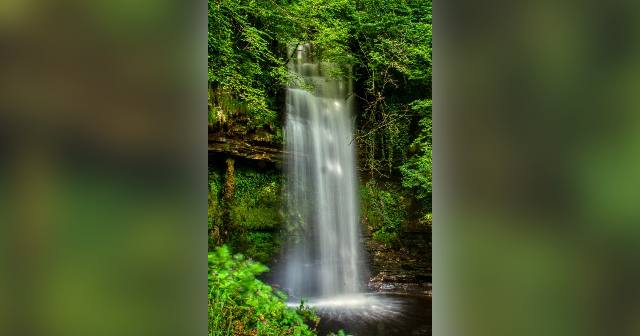
A tall photo as a link or landscape post
Link and landscape post · Show whole photo
Cropping this 2:3 waterfall to 1.91:1 would leave only a thin slice of the falls. Keeping it whole on a blurred background gives a wide image that still shows the entire waterfall, top to bottom.

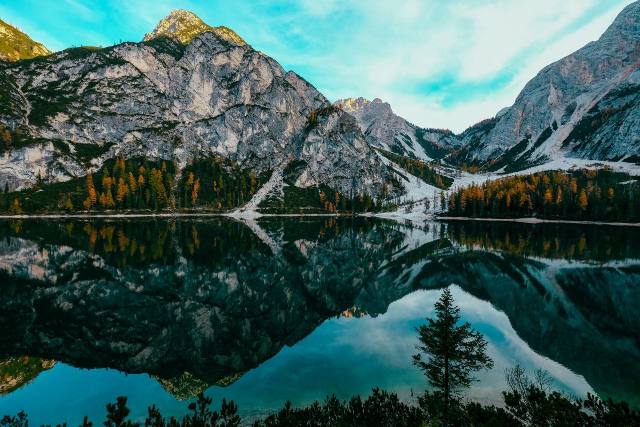
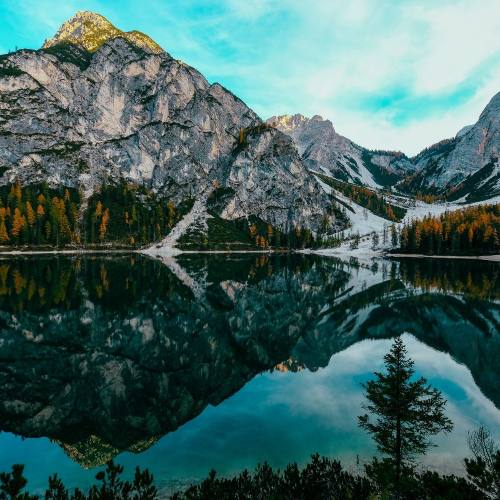
A landscape cropped to a square feed post
Feed post, square · Crop to fill
A square crop from the centre of the lake keeps the peak and its reflection. Square posts look the same on phones and computers, so there are no surprises after you publish.
Which Facebook Size to Use
Feed posts: square or 4:5
Both show in full on phones, where most people scroll. A 4:5 post is taller and takes more of the screen; a square one looks identical on every device.
Links and event images: 1.91:1
Shared links, events and many ads use this wide shape. If your photo is tall, keep it whole on a background rather than cutting it to a narrow strip.
Cover photos: keep the subject central
Computers show a wide cover; phones show a narrower slice of the middle. The safe-zone overlay marks the side areas that phones trim, and your profile picture overlaps the lower left.
Stories: full-screen 9:16
The top and bottom bands hold your name and the reply bar. Keep text between them, and use Show whole photo for landscape pictures.
How to Resize an Image for Facebook
- 1
Choose the Facebook size
Facebook is already selected. Pick a feed post, link image, story, cover or profile picture.
- 2
Add your image
Drop a JPG, PNG or WebP file onto the tool, choose it from your device, or paste a screenshot.
- 3
Position it
Drag the preview to pick what stays in the crop, zoom in if you like, or keep the whole picture on a background.
- 4
Download
Save the file and upload it to Facebook. Check the cover on your phone too, since it shows less of the sides.
Tips for Facebook Images
- Put words and faces in the middle of a cover photo. The edges are trimmed on phones.
- Avoid small text in feed images. Facebook compresses uploads, and fine text blurs first.
- Use a square post when you are not sure how people will see it. It looks the same everywhere.
- Save photos as JPEG and graphics with sharp lines, like logos or text, as PNG.
- For a profile picture, check the circle overlay. Corners are hidden.
Frequently asked questions
What size should a Facebook post image be?
1080 × 1080 for a square post or 1080 × 1350 for a taller 4:5 post. Both display in full in the phone feed. For link previews and wide photos, use 1200 × 630.
What size is a Facebook cover photo?
Facebook displays Page covers at 820 × 312 on computers. The tool exports 1640 × 624, twice that size, so the cover stays sharp on high-resolution screens. Phones show a narrower slice of the middle, so keep important parts central.
How do I stop Facebook cropping my photo?
Send an image that already has the shape Facebook wants. Choose the size in the tool and pick Show whole photo, which adds a background instead of cutting anything off.
What is the Facebook story size?
1080 × 1920 pixels, a 9:16 vertical frame. Keep about 14% at the top and bottom free of text, as Meta suggests; the tool's overlay shows that area.
Is my image uploaded when I use this tool?
No. Everything happens in your browser. The image never leaves your device until you upload it to Facebook yourself.
Resize Images for Other Platforms
Each page opens the same tool on that platform's sizes, with its own guide and examples.