

Resize Image for TikTok
TikTok is built around a full-screen 9:16 frame, and its buttons and captions sit on top of your picture. Resize your photo to that frame below, see which areas the app covers, and keep the important parts clear.
Free to use · No signup · No watermark
Step 1: Add your photo
JPG, PNG or WebP. It stays on your device.
Drop your photo here
or choose a file from your device
Your image is resized in your browser and never uploaded.
TikTok Image Sizes
TikTok's feed is 9:16 vertical. Photos in other shapes are shown with bars around them, so resizing to 1080 × 1920 first lets you decide what fills the screen.
| Format | Size (px) | Ratio | Good to know |
|---|---|---|---|
| Photo post or video cover | 1080 × 1920 | 9:16 | Full-screen in the For You feed. Photo carousels use the same shape. |
| Square photo | 1080 × 1080 | 1:1 | TikTok shows it with space above and below. Handy for reusing an Instagram post. |
| Profile picture | 720 × 720 | 1:1 | TikTok needs at least 200 × 200. It is shown as a circle. |
Checked against TikTok Ads Help: in-feed ad specifications on September 18, 2026. Platforms change these numbers without notice, so check before a big campaign.
Photos Resized for TikTok
Both images came from the tool on this page. Labels show the export size.
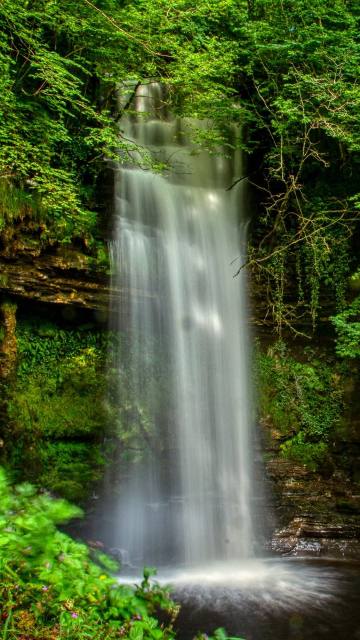
A portrait photo cropped to full screen
Photo post · Crop to fill
A 2:3 photo is close to 9:16 already, so only the sides are trimmed. The falls stay in the centre, clear of the buttons down the right edge.

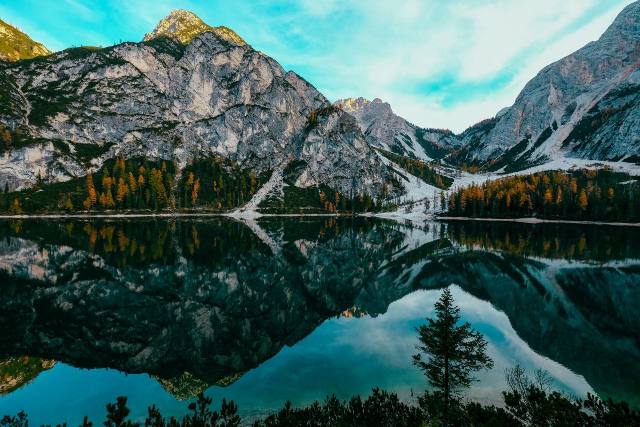
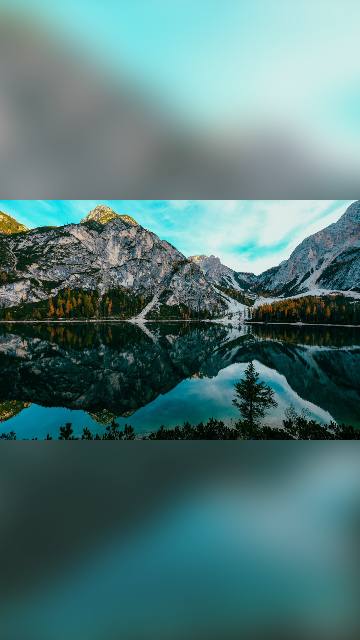
A landscape photo kept whole
Photo post · Show whole photo · Blurred photo
Cropping a wide landscape to 9:16 keeps only a narrow slice. Keeping it whole puts the photo in the middle of the screen, above the caption, with a blurred version behind it.
Designing Around TikTok's Screen
Leave the right edge clear
The like, comment, share and profile buttons run down the right side. Keep faces and text away from that column.
Keep the bottom quarter for the caption
Your username, caption and the sound line cover the lower part of the screen. TikTok says the covered area grows with a longer caption.
Crop portraits, fit landscapes
Tall photos crop to 9:16 with little loss. Wide photos lose most of the scene, so keep them whole on a blurred background.
Use the same size for every slide
In a photo carousel, slides in one shape look smoother as people swipe. Resize them all to 1080 × 1920.
How to Resize a Photo for TikTok
- 1
Choose the TikTok format
TikTok is already selected. Use the full-screen size for photo posts and covers, or square for a reused post.
- 2
Upload your photo
Drop the image onto the tool or choose it from your phone's gallery.
- 3
Check the safe zone
The shaded overlay shows roughly where TikTok's buttons and caption sit. Drag the photo so the subject stays clear.
- 4
Download and post
Save the file to your phone and add it to a photo post or as a cover in the TikTok app.
Tips for TikTok Photos
- TikTok's text and icons are white. A very bright or white background makes them hard to read, which TikTok's own ad help points out.
- The safe-zone overlay is an approximation. Preview the post in the app before publishing if text placement matters.
- Resize every photo in a carousel to the same size so none of them jumps as people swipe.
- Use a photo at least 1080 pixels wide for a crop, or the result will be enlarged and look soft.
- For a profile picture, keep your face in the centre of the circle.
Frequently asked questions
What size should a TikTok photo be?
1080 × 1920 pixels, a 9:16 vertical frame. It fills a phone screen held upright.
How do I post a landscape photo on TikTok without cropping?
Choose the full-screen size, then pick Show whole photo. The whole picture stays in view and a blurred copy of it fills the space above and below.
Where is the TikTok safe zone?
TikTok's buttons run down the right side and the caption covers the lower part of the screen. The exact area depends on caption length, so the overlay in the tool is an approximate guide rather than a fixed rule.
What size is a TikTok profile picture?
TikTok needs at least 200 × 200 pixels. The tool exports 720 × 720 so it stays sharp, and shows the circle it will be cut to.
Is my photo uploaded?
No. Your browser does the resizing. Nothing is sent anywhere until you post it to TikTok yourself.
Resize Images for Other Platforms
Each page opens the same tool on that platform's sizes, with its own guide and examples.
- Resize Image for Instagram4:5 · 1:1 · 1.91:1 · 9:16
- Resize Image for Facebook1:1 · 4:5 · 1.91:1 · 9:16
- Resize Image for YouTube16:9 · 9:16 · 1:1
- Resize Image for LinkedIn1.91:1 · 1:1 · 4:5 · 4:1
- Resize Image for Pinterest2:3 · 1:1 · 9:16 · 16:9
- All social media sizesEvery platform in one tool, including X (Twitter).