

Resize Image for LinkedIn
LinkedIn uses very different shapes: a wide image for shared posts and links, a long 4:1 strip behind your profile, and an even narrower cover for company pages. Pick the one you need below and fit your image to it.
Free to use · No signup · No watermark
Step 1: Add your photo
JPG, PNG or WebP. It stays on your device.
Drop your photo here
or choose a file from your device
Your image is resized in your browser and never uploaded.
LinkedIn Image Sizes
LinkedIn Help recommends 1200 × 627 for shared images and gives fixed sizes for Page covers. Posts can also be square or 4:5 portrait.
| Format | Size (px) | Ratio | Good to know |
|---|---|---|---|
| Post or link image | 1200 × 627 | 1.91:1 | LinkedIn's recommended size for shared images and link previews. |
| Square post | 1200 × 1200 | 1:1 | Takes more of the feed than a landscape image, especially on phones. |
| Portrait post | 1080 × 1350 | 4:5 | The tallest shape that shows in the feed without being cut. |
| Profile background | 1584 × 396 | 4:1 | Your profile photo sits over the lower left, so keep that corner quiet. |
| Company page cover | 1128 × 191 | 5.9:1 | LinkedIn's size for a Page cover. Very wide, so crop carefully. |
| Profile photo or logo | 400 × 400 | 1:1 | Works for a personal photo (shown as a circle) or a company logo. |
Checked against LinkedIn Help: image specifications on September 18, 2026. Platforms change these numbers without notice, so check before a big campaign.
Images Resized for LinkedIn
Made with the tool on this page. Labels show the export size.
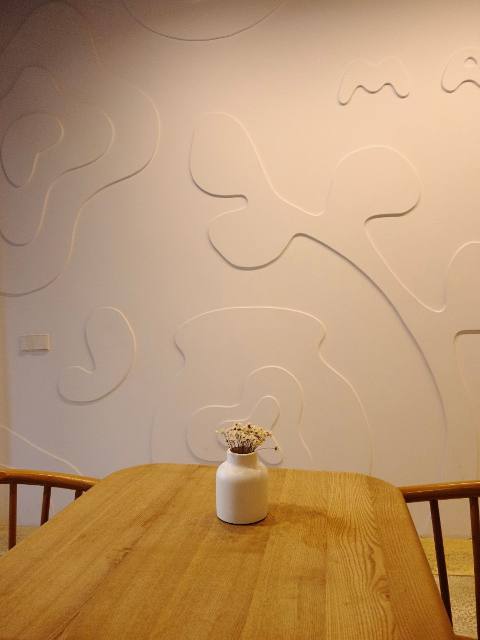
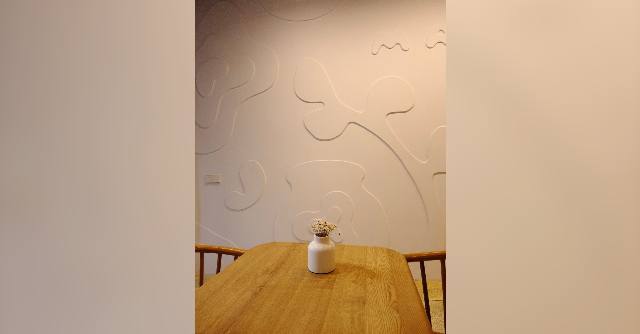
A product photo as a post image
Post or link image · Show whole photo
A 1.91:1 frame is much wider than a 3:4 product shot. Keeping the photo whole on a blurred background shows the full product, and the empty sides give room for a caption overlay if you add one later.
A landscape as a profile background
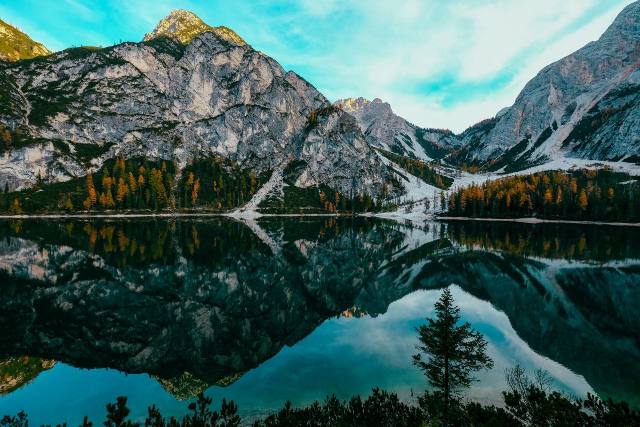
Profile background · Crop to fill
A 4:1 banner keeps only a band across the photo. Moving the crop up slightly keeps the peaks and the tree line; the lower left, where your profile photo sits, falls on calm water.

LinkedIn Sizes Explained
Posts and shared links: 1200 × 627
LinkedIn's recommended shape for images attached to posts and for link previews. Square and 4:5 portrait posts take up more of the feed on phones.
Profile background: 1584 × 396
A long 4:1 strip. Your profile photo covers part of the lower left, so keep that area simple. The overlay in the tool marks it.
Company page cover: 1128 × 191
Very wide and short. Pick photos with a horizontal subject, like a skyline or an office front, and use the position sliders to choose the band.
Profile photo and logo: square
Personal photos are shown as a circle, company logos as a square. A 400 × 400 image works for both.
How to Resize an Image for LinkedIn
- 1
Pick the LinkedIn size
LinkedIn is already selected. Choose a post image, profile background, company cover or profile photo.
- 2
Upload the image
Drop a JPG, PNG or WebP file onto the tool or choose it from your device.
- 3
Choose the crop
Drag the preview to pick the band that stays, or keep the whole image on a background.
- 4
Download and upload
Save the file and add it on LinkedIn. It already has the right shape, so LinkedIn's cropper has little to change.
Tips for LinkedIn Images
- Keep the lower left of a profile background plain. Your photo sits over it.
- Headshots look best with the face in the upper-middle of the circle and a little space above the head.
- Logos with text are clearer saved as PNG than JPEG.
- Link previews show at small sizes. Big, simple shapes read better than detailed scenes.
- Use the same crop on your LinkedIn and X headers for a consistent look.
Frequently asked questions
What is the best image size for a LinkedIn post?
1200 × 627 pixels for a landscape image, which LinkedIn recommends for shared images. Square 1200 × 1200 or portrait 1080 × 1350 posts take more space in the feed.
What size is the LinkedIn profile background?
1584 × 396 pixels, a 4:1 strip. Your profile photo overlaps the lower left, so keep important details out of that corner.
What size is a LinkedIn company page cover?
LinkedIn lists 1128 × 191 pixels for a Page cover image.
How do I stop LinkedIn cutting off my banner?
Upload an image that already has the exact shape. The tool crops to 1584 × 396, and you choose which band of the photo stays by dragging the preview.
Is my image kept private?
Yes. Resizing happens in your browser and nothing is uploaded to our servers.
Resize Images for Other Platforms
Each page opens the same tool on that platform's sizes, with its own guide and examples.