

Resize Image for YouTube
YouTube thumbnails need a 16:9 frame, Shorts need 9:16, and a channel banner has a narrow safe area in the middle that is the only part every device shows. Pick what you are making below and the tool sizes your image for it.
Free to use · No signup · No watermark
Step 1: Add your photo
JPG, PNG or WebP. It stays on your device.
Drop your photo here
or choose a file from your device
Your image is resized in your browser and never uploaded.
YouTube Image Sizes
YouTube Help lists a 16:9 thumbnail with a minimum width of 640 pixels, and a 2560 × 1440 channel banner whose middle strip is the only part shown on every device.
| Format | Size (px) | Ratio | Good to know |
|---|---|---|---|
| Video thumbnail | 1280 × 720 | 16:9 | Well above YouTube's 640 px minimum width, and small enough for the 2 MB limit in the mobile app. |
| Video thumbnail, 4K | 3840 × 2160 | 16:9 | The resolution YouTube Help lists. Only worth it if your photo has this many pixels. |
| Shorts thumbnail | 1080 × 1920 | 9:16 | Vertical, like the Short itself. YouTube's minimum height is 640 px. |
| Channel banner | 2560 × 1440 | 16:9 | YouTube's recommended size. TVs show all of it; phones show only the middle strip. |
| Channel picture | 800 × 800 | 1:1 | YouTube recommends 800 × 800. It is shown as a circle. |
Checked against YouTube Help: video thumbnails and channel branding on September 18, 2026. Platforms change these numbers without notice, so check before a big campaign.
Photos Turned Into YouTube Images
Results from the tool on this page, with the export size on each label.
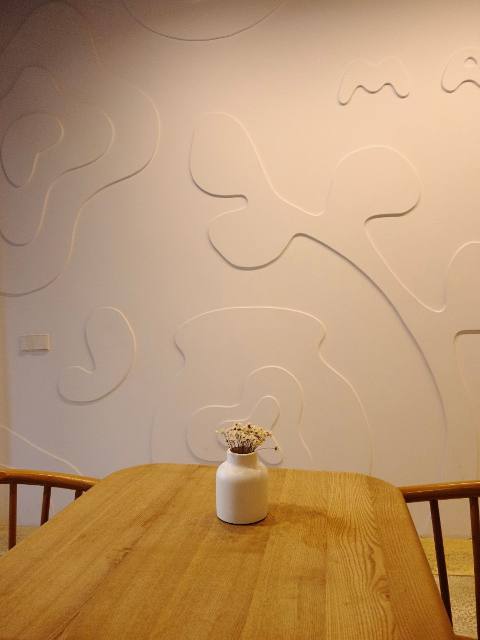
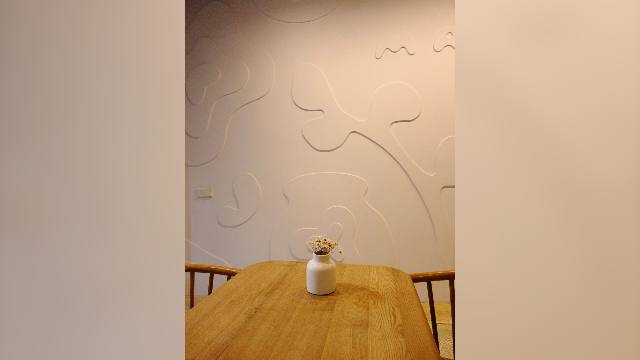
A portrait photo as a video thumbnail
Video thumbnail · Show whole photo
A 3:4 photo in a 16:9 thumbnail would lose most of its height if cropped. Keeping it whole leaves room on both sides, which is also where a title or a face usually goes in a thumbnail design.
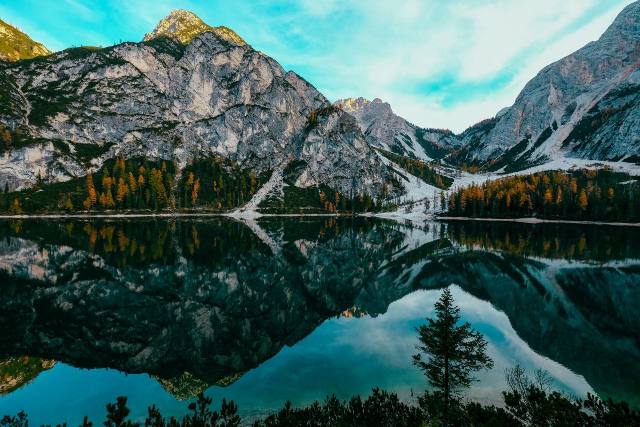
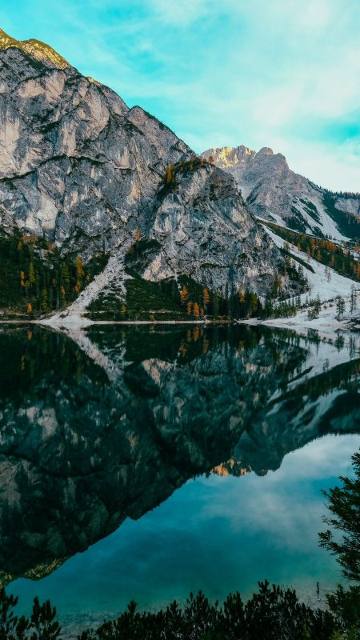
A landscape photo as a Shorts thumbnail
Shorts thumbnail · Crop to fill
The Shorts shelf shows tall 9:16 images. A centred crop from the lake keeps the peak and its reflection, which reads well even at the small size the shelf shows.
Getting YouTube Images Right
Thumbnails: 1280 × 720 is enough
YouTube Help lists 3840 × 2160, but 1280 × 720 looks sharp on phones and computers and stays well under the 2 MB limit in the mobile app. Choose the 4K size only if your photo is that big.
Channel banner: design for the middle
TVs show the whole 2560 × 1440 image, but phones show only a strip across the middle. Turn on the safe area in the tool and keep your channel name and any text inside it.
Shorts: vertical, like the video
A Shorts thumbnail uses the same 9:16 shape as the Short. YouTube asks for a minimum height of 640 pixels.
Channel picture: a centred circle
YouTube recommends an 800 × 800 image and shows it as a circle, so the corners disappear.
How to Make a YouTube Thumbnail or Banner
- 1
Choose the YouTube format
YouTube is already selected. Pick a video thumbnail, Shorts thumbnail, channel banner or channel picture.
- 2
Upload a frame or photo
Use a still from your video, a photo or a design. JPG, PNG and WebP all work.
- 3
Crop or fit
Drag to choose the crop, or keep the whole image on a blurred or solid background.
- 4
Download and upload in Studio
Save the file, then add it in YouTube Studio under the video's details or your channel's branding.
Tips for YouTube Images
- Pause your video on a sharp frame and take a screenshot. Paste it straight into the tool with Ctrl+V or Cmd+V.
- Thumbnails appear tiny in search results and on phones. Use large faces and few words.
- The lower right of a thumbnail shows the video length, so keep important details out of that corner.
- If a thumbnail file is too big, run it through Resize Image to KB and set a 2MB limit.
- Check your banner on a phone after uploading. Only the safe area will show there.
Frequently asked questions
What size is a YouTube thumbnail?
16:9, with a minimum width of 640 pixels. 1280 × 720 is the most common choice. YouTube Help lists 3840 × 2160 as the resolution to aim for, and the tool offers both.
What is the YouTube banner size and safe area?
YouTube recommends 2560 × 1440. At its minimum size of 2048 × 1152, the area safe on every device is 1235 × 338 in the middle. The tool draws that strip over the preview, scaled to the size you export.
What size is a YouTube Shorts thumbnail?
A 9:16 vertical image. The tool exports 1080 × 1920. YouTube's minimum is 640 pixels tall.
Why is my thumbnail rejected for being too large?
The YouTube mobile app accepts thumbnails up to 2 MB. Save as JPEG rather than PNG, or reduce the file with the Resize Image to KB tool.
Does the tool upload my image to YouTube?
No. It prepares the file on your device. You upload it to YouTube Studio yourself.
Resize Images for Other Platforms
Each page opens the same tool on that platform's sizes, with its own guide and examples.
- Resize Image for Instagram4:5 · 1:1 · 1.91:1 · 9:16
- Resize Image for Facebook1:1 · 4:5 · 1.91:1 · 9:16
- Resize Image for TikTok9:16 · 1:1
- Resize Image for LinkedIn1.91:1 · 1:1 · 4:5 · 4:1
- Resize Image for Pinterest2:3 · 1:1 · 9:16 · 16:9
- All social media sizesEvery platform in one tool, including X (Twitter).