

Resize Image for Instagram
Instagram crops anything outside its accepted shapes, and it rarely cuts where you would. Choose a post, story or Reel size below, decide what stays in the frame, and download a file that Instagram will show exactly as you see it here.
Free to use · No signup · No watermark
Step 1: Add your photo
JPG, PNG or WebP. It stays on your device.
Drop your photo here
or choose a file from your device
Your image is resized in your browser and never uploaded.
Instagram Image Sizes
Feed posts can be anything from 1.91:1 wide to 4:5 tall. Width is 1080 pixels for every size below, which is the most Instagram displays, so there is no reason to go bigger.
| Format | Size (px) | Ratio | Good to know |
|---|---|---|---|
| Portrait post | 1080 × 1350 | 4:5 | The tallest shape the feed shows without cropping, so it takes up the most screen. |
| Square post | 1080 × 1080 | 1:1 | The classic feed shape. Also a safe choice for every slide of a carousel. |
| Landscape post | 1080 × 566 | 1.91:1 | The widest shape the feed accepts. Anything wider is cropped at the sides. |
| Story | 1080 × 1920 | 9:16 | Fills a phone screen held upright. |
| Reel cover | 1080 × 1920 | 9:16 | Full-screen in Reels; the profile grid shows a crop from the middle. |
| Profile picture | 320 × 320 | 1:1 | Instagram shows profile photos at up to 320 × 320, inside a circle. |
Checked against Instagram Help Center: photo sizes on September 18, 2026. Platforms change these numbers without notice, so check before a big campaign.
The Same Photos, Made for Instagram
Both results came from the settings shown, using the tool on this page. Labels show the real export size.
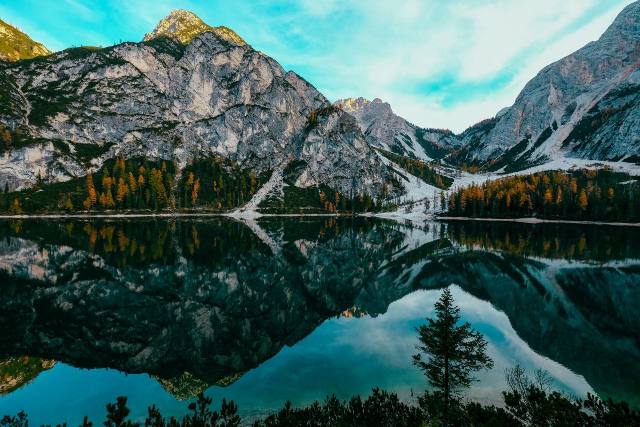
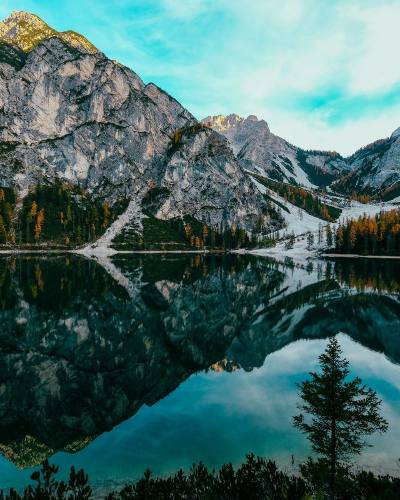
A landscape photo as a 4:5 portrait post
Portrait post · Crop to fill
A 1200 × 800 landscape only keeps its middle as a 4:5 portrait, so position matters. Here the crop is nudged slightly right to keep the pine tree in the lake. Portrait posts take the most room in the feed, which is why they are the default in the tool.
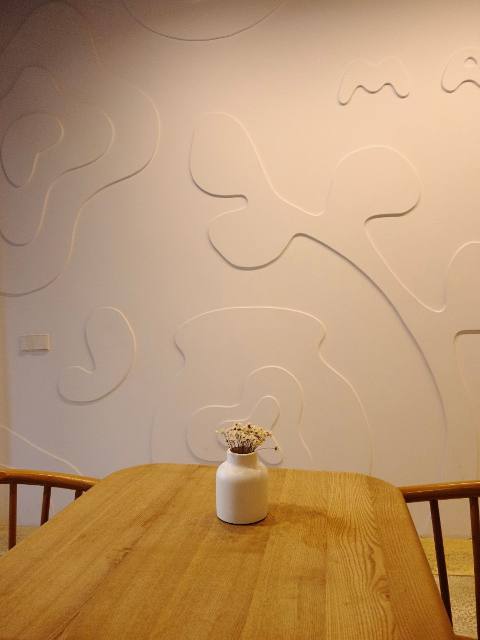
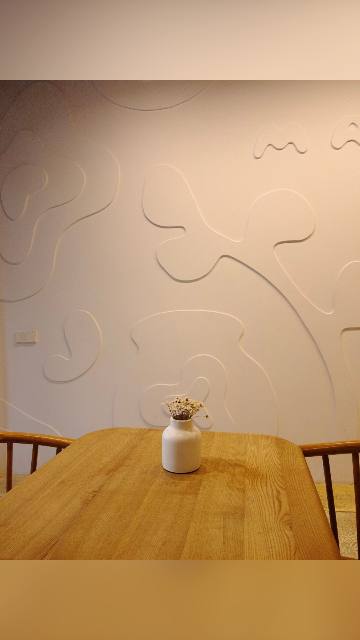
A product photo kept whole in a story
Story · Show whole photo · Blurred photo
Cropping a 3:4 product photo to 9:16 would cut off the sides of the table. Show whole photo keeps all of it and fills the space above and below with a soft, blurred copy of the same picture, so the story does not look like it has black bars.
Choosing the Right Instagram Shape
Portrait 4:5 for most feed posts
It is the tallest shape the feed shows uncropped, so your post fills more of the screen as people scroll past. Most phone photos are 3:4, so only a thin strip is trimmed.
Square for carousels and grids of products
Every slide of a carousel takes the shape of the first one. Square is a safe choice when the slides mix portrait and landscape shots.
Landscape 1.91:1 only when width matters
Wide panoramas and group photos work at 1.91:1, but they appear small in the feed. If the scene allows, a 4:5 crop usually gets more attention.
9:16 for stories and Reel covers
Stories and Reels fill the whole screen. Turn on the safe zone in the tool: Instagram puts your name at the top and the reply bar or caption at the bottom, so keep text out of those bands.
How to Resize a Photo for Instagram
- 1
Pick the Instagram size
Instagram is already selected. Choose portrait, square, landscape, story, Reel cover or profile picture.
- 2
Upload your photo
Drop a JPG, PNG or WebP onto the tool, pick it from your phone, or paste a screenshot.
- 3
Crop or keep it whole
Crop to fill and drag the preview to choose what stays, or switch to Show whole photo and pick a blurred or solid background.
- 4
Download and post
Save the file and upload it to Instagram. Because it already has the right shape, Instagram has nothing to crop.
Tips for Sharper Instagram Photos
- Start from the original photo, not a screenshot or a copy that went through a messaging app. Both have already lost detail.
- A photo narrower than 1080 pixels is enlarged to fit, which can look soft. The tool warns you when that happens.
- Keep text inside the safe zone on stories and Reel covers so Instagram's buttons do not cover it.
- The profile grid shows a crop of each post. Keep the subject near the centre of a 4:5 post so it survives the grid.
- For a profile picture, put the face in the middle of the circle. Everything outside the ring is hidden.
Frequently asked questions
What is the best image size for an Instagram post?
1080 × 1350 pixels, a 4:5 portrait. It is the tallest shape Instagram shows without cropping, so it takes up the most space in the feed. Square 1080 × 1080 and landscape 1080 × 566 also work.
How do I post a full photo on Instagram without cropping?
Choose the size you want, then switch to Show whole photo. The tool keeps every part of the picture and fills the leftover space with a blurred copy of the photo or a solid color. Instagram then has nothing to cut.
What size is an Instagram story?
1080 × 1920 pixels, a 9:16 vertical frame. Meta's ads guidance suggests keeping about 14% at the top and bottom free of text and logos, which is the band the tool's safe-zone overlay shades.
Why does Instagram make my photos blurry?
Instagram re-compresses every upload, and it scales images wider than 1080 pixels down. Sending a file that is already 1080 pixels wide, in the right shape, means Instagram changes it less. A photo that was small to begin with will also look soft, because it has to be enlarged.
Does this tool post to Instagram for me?
No. It only prepares the file. Download it, then upload it in the Instagram app as usual. The tool never connects to your account.
Are my photos uploaded anywhere?
No. Your browser crops and saves the image on your device. Nothing is sent to a server.
Resize Images for Other Platforms
Each page opens the same tool on that platform's sizes, with its own guide and examples.