

What Is a HEIC File? How to Open and Convert iPhone Photos
What a HEIC file is, how it compares with JPG, and how to open or convert iPhone photos on Windows, Android or any browser.
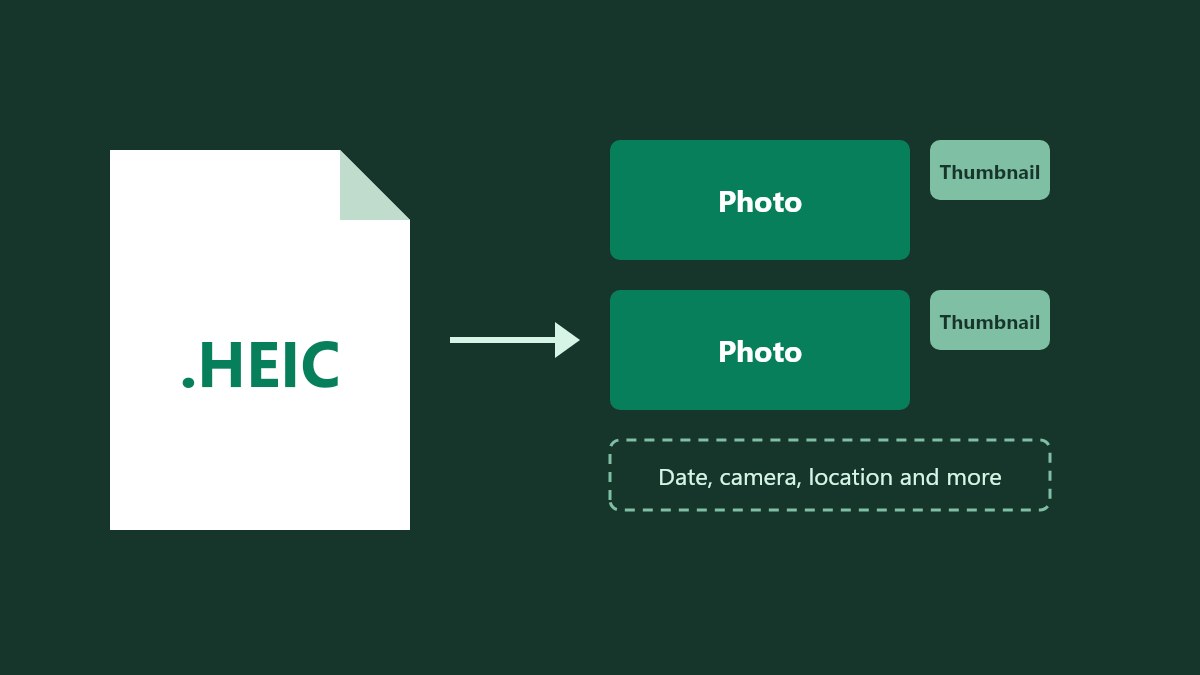
What is HEIC? HEIC is an image format used by iPhones. It is compressed using HEVC (the same compression used for HD videos), and so it is typically smaller than JPG images.
However, HEIC files may not open on many Windows computers, most browsers, or upload forms. You can easily convert them to JPG.
Quick Answer
| Question | Answer |
|---|---|
| Description | Apple Default Photo Format (HEIF file compressed with HEVC) |
| Extension | .heic |
| Default on iOS (iPhone) since | iOS 11 (2017) |
| Typically smaller than JPG | Usually, depending on JPG quality |
| Opens on | iPhone, iPad and Mac. Requires additional software to open on Windows. Opens on most Android phones (with OS 9 or above). |
| Opens in browsers | Only in Safari |
| Best solution | Convert to JPG |
What Does HEIC Stand For?
HEIC comes from HEIF (High Efficiency Image File Format) and HEVC (High Efficiency Video Coding). HEIC is a HEIF file, but with images compressed using HEVC.
You can see this inside the file itself. The first few bytes in the HEIC file list the types (called brands) it belongs to. In our example HEIC file, these include 'heic' and 'mif1' (general HEIF).
How Do HEIC Files Work?
HEIC files are container files. This means that multiple images and metadata can be contained within just one file.
In our example HEIC file (from the open source library libheif, which many apps use to open HEIC files), we can see the following content in the 701KB file:
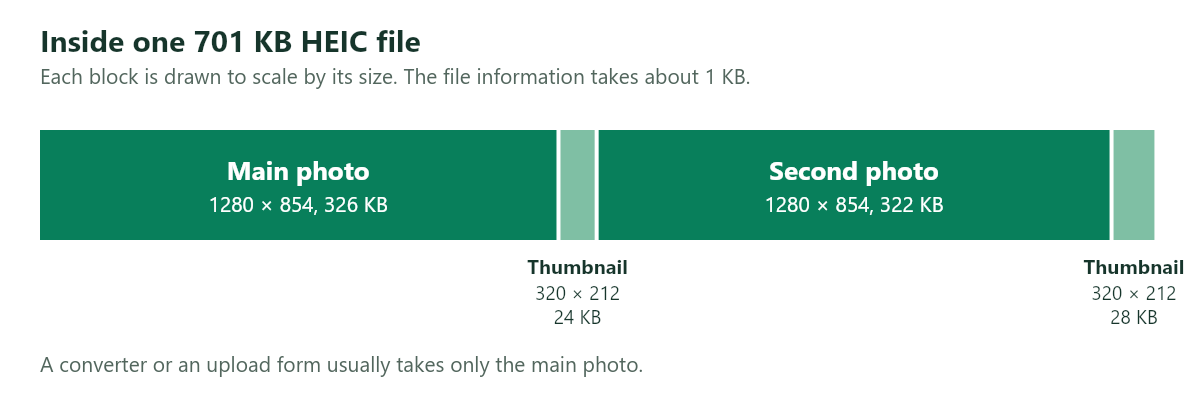
In this file, we have 2 full-size images, each with its own thumbnail. There is also approximately 1KB of metadata describing how these pieces fit together. One image is marked as the main image. This is shown in image viewers.
On an iPhone, HEIC files function in the same way. They can include thumbnails to allow for quick image previews, as well as metadata such as date, camera settings, and location (if location services are enabled).
HEIF vs HEIC
HEIF is the container format. It is a standard created by MPEG. HEIC is a type of HEIF file, compressed with HEVC.
All HEIC files are HEIF files, but not all HEIF files are HEIC. Other image formats, such as AVIF, work in the same container format but compressed with AV1. However, in practice, most apps will handle .heic and .heif files in the same way.
HEIC vs JPG: Which Is Smaller?
HEIC is often said to be half the size of JPG. While Apple states that HEIF and HEVC "use less storage space on your devices and iCloud Photos, while preserving the same visual quality", no exact number is given. We tested this.
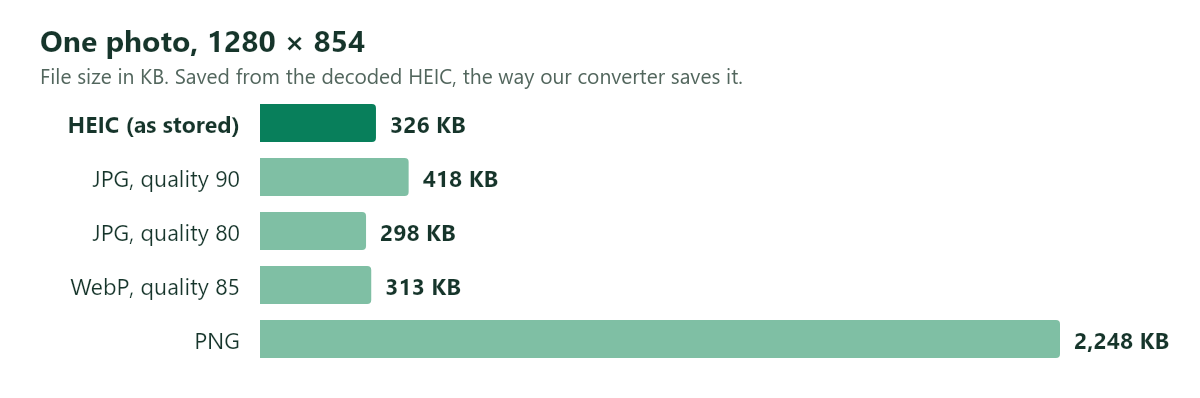
By decoding the main image in our example file (using the same library that we use in our HEIC to JPG converter), we converted it into different formats:
| Format | File Size | Difference from HEIC file |
|---|---|---|
| HEIC | 326KB | Same |
| JPG (Quality: 90) | 418KB | 28% larger |
| JPG (Quality: 80) | 298KB | 9% smaller |
| WebP (Quality: 85) | 313KB | 4% smaller |
| PNG | 2248KB | ~7x larger |
Depending on the quality of the JPG, you can get significantly different results. In our example, at quality 90 (default in our converter), the file was 28% larger than HEIC. However, reducing the quality to 80 made it slightly smaller. As this example was not taken on an iPhone, you may get different results for your own images. For further information on what may affect image file sizes, see Why is my image file so large?
Why Do iPhones Use HEIC Files?
iPhones and iPads (since iOS 11) default to saving images in HEIC format. In your camera settings, this option is called 'High Efficiency'. This means that the image takes up less space in your phone and in iCloud Photos, however, it maintains the same visual quality.
The issue with these files is that they only work seamlessly on Apple devices. Here is a breakdown of where you can open HEIC files:
| Device | Can HEIC be opened? |
|---|---|
| iPhone/iPad | Yes (iOS 11+) |
| Mac | Yes (macOS High Sierra+) |
| Windows 10/11 | Yes (requires free HEIF Image Extension). Some files also require the HEVC Video Extensions. |
| Android | Can be decoded on Android 9+, however this is not available on all devices. |
| Browsers | Only in Safari (version 17+) |
| Upload forms | Many only accept JPG/PNG. |
On Android, HEIF support is optional. Therefore it depends on the manufacturer. On browsers, Can I use shows that only Safari can display HEIC images.
Different upload forms may require different image types. The passport renewal form in the USA allows HEIC files, however visa photographs must be in JPEG format (see our digital passport photo guide). If you have issues uploading an image, see our guide to common image upload issues and solutions.
Common HEIC Problems and How to Fix Them
These are the problems people run into most with HEIC files, what usually causes them, and the quickest fix.
| What happens | What it usually means | What to do |
|---|---|---|
| The photo won't open in the Windows Photos app | Windows is missing the HEIF Image Extension, or the photo also needs the HEVC Video Extensions | Install the free HEIF Image Extension, or convert the photo to JPG |
| A website or form says the file type isn't allowed | The form accepts only JPG or PNG | Convert the photo to JPG |
| The photo won't show in Chrome, Edge or Firefox | Only Safari displays HEIC images | Convert it to JPG or WebP |
| Your Android gallery can't open it | HEIF support is optional on Android, so not every phone has it | Convert the photo to JPG |
| You renamed .heic to .jpg and it still fails | The data inside is still HEIC | Convert the photo instead of renaming it |
| Photos copied to your PC arrive as JPG | Your iPhone converts them during a USB import | Turn on Keep Originals in Settings > Apps > Photos if you want HEIC |
How to Open HEIC Files
iPhone/iPad/Mac
Open in the Photos app, or if on Mac simply double-click the file to open it in Preview.
Windows
- Download and install the free HEIF Image Extension from the Microsoft Store.
- Open the image in the Photos app.
- If it still does not open, you may need to install Microsoft’s HEVC Video Extensions (this is a paid extension in most regions). Alternatively, for only a few images, convert the file. See below.
Android
Open in Google Photos, or your gallery app. If you have an Android 9+ device, it should be able to open the file. If not, convert to JPG.
All Devices
Use our HEIC to JPG converter in your browser. It can be used on Windows, Android, Chromebook and Mac, and no installation is required.
How to Convert HEIC to JPG
- Use our HEIC to JPG converter.
- Drag and drop (or select) your desired HEIC image.
- Set the quality (90 is the default setting). Lowering the quality will decrease file size.
- Download your converted image.
Since this is done within your browser, your image is not uploaded to any website. If you want a smaller file for a website, you can convert HEIC to WebP.
Things to note
- The JPG file will generally be larger. In our test, it was 28% larger at quality 90.
- Only the main image will be converted. Any additional images within this file will remain in HEIC.
- Metadata will not be converted. Date, camera settings and location will not be included. This can be useful if you do not wish to share location data with someone.
You may wish to keep the original HEIC file in case you need this information. Simply renaming the file extension (from .heic to .jpg) will not convert it. This means that although the file appears to be a JPG, it contains HEIC data.
How to Make Your iPhone Not Save Images as HEIC
You can change this setting to make your iPhone save images as JPG:
- Go to Settings > Camera > Formats.
- Select Most Compatible.
This means new images will be saved as JPG, and new videos will be saved as H.264. Existing images will still be in HEIC format, and new images will use more storage.
Alternatively, you can leave High Efficiency selected. When transferring images via USB to a computer, Apple states that if you do not have Keep Originals enabled (Settings > Apps > Photos), "they might be converted to JPEG". However, you can also manually convert HEIC to JPG.
For help choosing the correct format for a particular task, see PNG vs JPG.
Common Questions
Is HEIC better than JPG?
On an Apple device, generally yes as HEIC images take up less space. However, if you want to share/upload images, or open them on other devices, JPG is better as it is universal.
Is HEIC the same as HEIF?
Very similar! HEIF is the container format. HEIC is a HEIF file with HEVC compression. In most apps they act the same way.
Will converting HEIC to JPG reduce quality?
Slightly. However, if using quality 90, you will likely not notice a difference.
Can I open HEIC files without installing anything?
Yes. Either by using a browser-based converter (such as our HEIC to JPG converter) or by opening in Safari on Mac.
Can I make my iPhone save images as HEIC again?
Yes. Go to Settings > Camera > Formats. Select High Efficiency.
Why won't my HEIC file open on Windows?
Windows needs Microsoft's free HEIF Image Extension to read HEIC files, and some files also need the HEVC Video Extensions. Install the extension from the Microsoft Store, or convert the photo to JPG with our HEIC to JPG converter.
Why won't a website accept my iPhone photo?
Your iPhone saves photos as HEIC, and many upload forms accept only JPG or PNG. Convert the photo to JPG and upload it again. If the form then says the file is too large, see our guide to photo upload errors.
Why are my iPhone photos JPG when I copy them to my PC?
When you import photos over USB, your iPhone can convert them to JPG. Apple says this happens unless Keep Originals is turned on under Settings > Apps > Photos.
Does converting HEIC to JPG remove the location?
With our converter, yes. The JPG is made from the pixels only, so the date, camera settings and location are not copied. Keep the original HEIC if you need that information.
Conclusion
HEIC is the default image format on iPhones. It is a HEIF file with HEVC compression. It can include multiple images, thumbnails and metadata in one file. Typically, it will be smaller than JPG. However, this depends on the quality setting. In our test, depending on the quality, sometimes JPG was significantly larger and sometimes slightly smaller.
If you cannot open HEIC files, or they are rejected by upload forms, convert them using our HEIC to JPG converter. Be sure to save a copy of the original. If you would like to stop receiving HEIC files, switch your iPhone camera settings to Most Compatible.

 Photo Stretcher
About Sabir Ali
Founder of Photo Stretcher
I built Photo Stretcher because resizing an image online usually means uploading it to a stranger's server and hoping for the best. Everything here runs in your browser instead: a stretcher, a resizer, a KB compressor, a converter. Your files never leave your device, and no pixel is invented by AI.
I review every guide on this site before it goes live. If a method stops working, I update the guide.